2
Installation
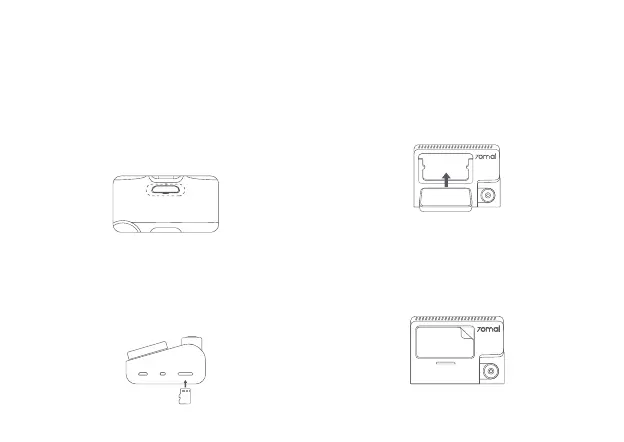
1. Installing the electrostatic sticker.
Clean your windshield and put the electrostatic
sticker on the recommended area as shown in the
figure below. Avoid the edge of the windshield and
select the flat and smooth area for the installation.
Make sure you remove air bubbles between the
sticker and the glass.
2. Installing the memory card.
Insert the memory card into the card slot with its
contacts facing up until you hear a click. The memory
card is well-installed.
3. Installing the mount.
Attach the mount into the slot and slide up, as shown
in the figure below. You will hear a snap when it is in
place. Make sure the mount is securely installed to
the dash cam.
4. Mounting the dash cam.
Peel off the protective film from the adhesive sticker
on the base of the mount, and paste the dash cam
onto the electrostatic sticker in the dotted area.
'&,1$9,1
0LFUR6'


 To Next Page