| Main Functions
26
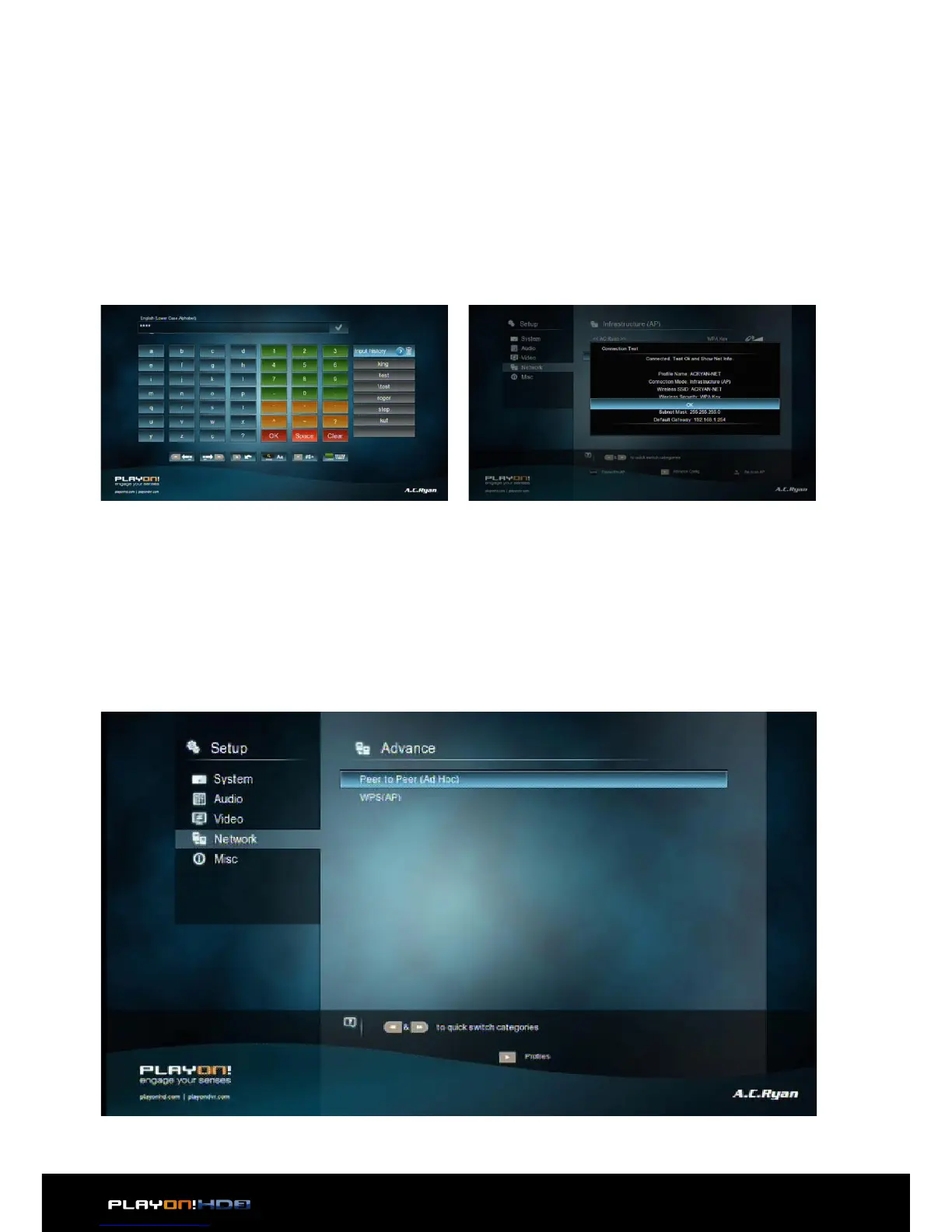
Step 2, Input WEP / WPA key
Press OK to input encryption keys via the virtual keyboard. Press the navi-
gational buttons to select, OK to input, FFWD to move cursor left, FRWD
to move cursor right, Zoom to switch between uppercase and lowercase,
Stop to delete a character, Play to make more symbols available, Green to
change the language of the virtual keyboard, OK to confirm and to start test-
ing the connection.
The testing process will take a while, please be patient. If the test is ok, the
network information (Profile Name, IP address, Subnet Mask, Gateway, etc.)
will be displayed on the screen.
Peer to Peer (Ad Hoc)
• Peer to Peer mode, which is also called Ad Hoc mode or computer-to-computer
mode, is used to connect wireless clients directly together, without the need for
a wireless router or access point.


 To Next Page