| Main Functions
52
3 Updating existing Jukebox
You can update the existing Jukebox if you have add/remove
movies to the previously saved directory.
Launch Run or Update YAMJ by double clicking on the icon on
your desktop or from the Start Menu, AC Ryan Movie Jukebox
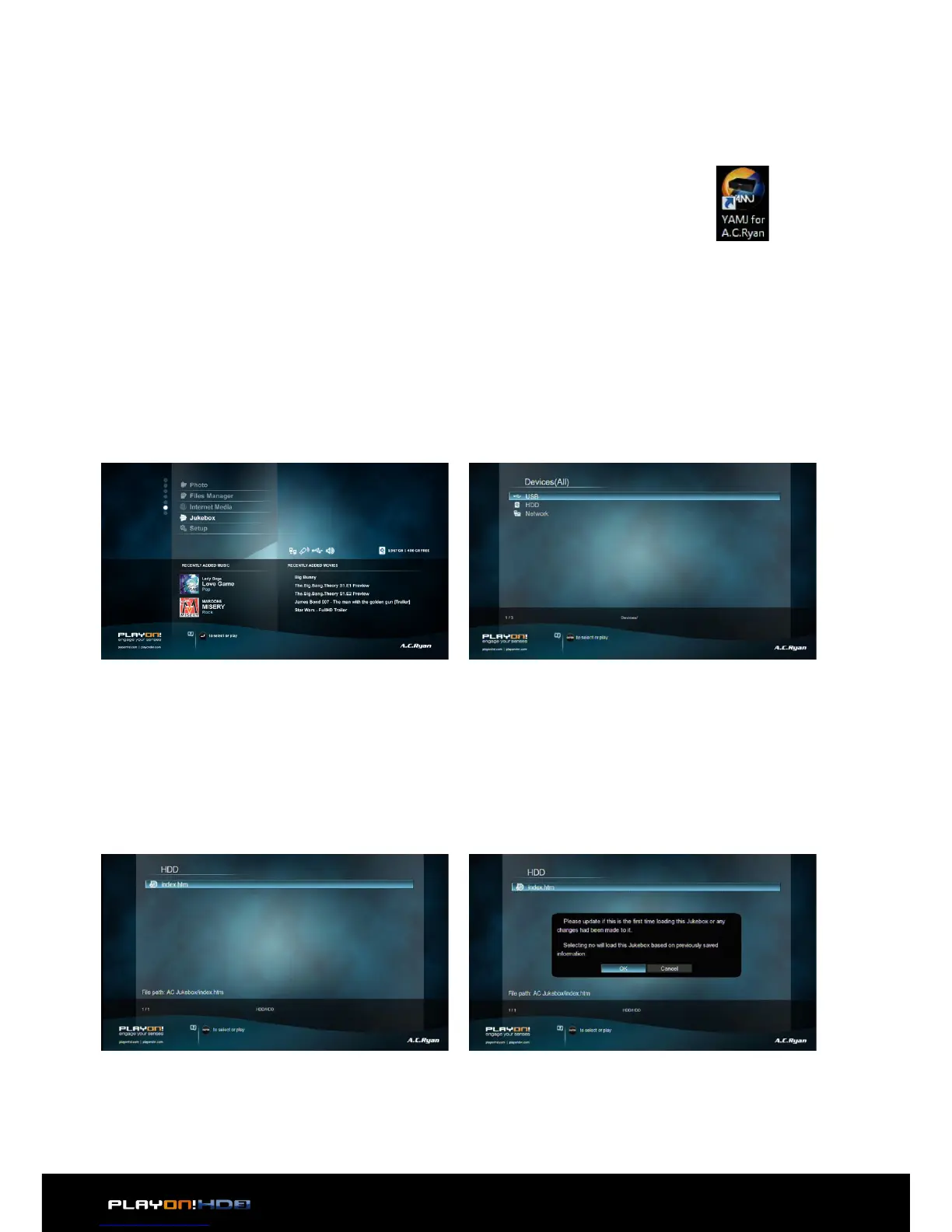
From the Home menu screen, select Jukebox icon to enter the Movie Jukebox
menu.
Go to the location of your Jukebox where it was generated with YAMJ for AC Ryan.
Upon entering the location, the system will search and display all generated Jukebox
information for loading (if you have more than one)
A message box will ask if you want to update the selected Jukebox
- Choose OK if you are loading it for the first time or made any changes.
- Choose Cancel to continue loading for the second time or if you did not do any
changes.
*: Updating the Jukebox for the first time may take a while depending on the location of your stored Jukebox
and the amount of movies this Jukebox has. You can speed load the same Jukebox again the next time by
selecting Cancel.
Running Movie Jukebox


 To Next Page