The Master-9 is a 9-channel programmable pulse stimulator designed for nerve and muscle stimulation procedures, as well as a broad range of neurophysiological stimulation requirements. It offers a user-friendly interface, making it easy to learn and program using pre-programmed paradigms.
Function Description:
The Master-9 functions as a versatile pulse stimulator with nine independent channels. Each channel can deliver repetitive, single, train, or twin outputs, configurable as monophasic, biphasic, or ramp pulses. Channels can operate independently or be synchronized to produce complex pulse patterns. This allows for simultaneous stimulation of a preparation and triggering of other instruments (e.g., oscilloscopes, PCs) in synchronization with the stimulation.
Important Technical Specifications:
- Channels: 9 independent channels.
- Output Types: Repetitive, single, train, twin.
- Pulse Shapes: Monophasic, biphasic, ramp.
- Voltage Amplitude (V): -10V to +10V.
- Voltage Increment/Decrement Steps (v): Minimum step of 0.01V (10 mV).
- Output Current: 20 mA.
- Duration (D): 4 µsec to 3600 sec.
- Delay (L): 4 µsec to 3999 sec.
- Interval (I): 40 µsec to 3999 sec (must be > Duration in FREE-RUN, TRAIN, TWIN, GATE modes).
- Ramp Duration: 5 msec to 60 sec.
- Number of Pulses per Train (N): 1 to 60,000.
- External Trigger Inputs: IN 1, 2, 3 (3V to 10V range).
- External Waveform Recording (Channel 9):
- MEM memory: 1000 points (up to 32K points in paradigm 9).
- Point values: -10 to +10 (output voltage levels), with a maximum of 2 digits following the decimal point.
- Minimal time resolution (paradigm 9): 5 µsec from one point to the next.
- Internal Clocks:
- "Clock": Counts time in seconds up to 24 hours.
- "Stopwatch": Counts time in tenths of seconds up to 1 hour.
- Connectivity: USB interface for PC communication.
Usage Features:
- Control:
- Standalone Unit: Via its integrated touchscreen (TS) on the front panel. The TS displays all modes of operation, time parameters, and internal connection tables. Parameters are set by touching the screen with a finger, stylus, or standard pen (avoid ink or sharp tools).
- PC Control: Using the MASTER-9 CONTROL software, which allows viewing and modifying parameters on a PC monitor. This software also includes a "Scheduler" for setting timed events (triggering channels, switching paradigms, modifying parameters).
- Custom Applications: Through the Master-9 SDK (Software Development Kit), enabling programming and control from within applications like LabView, Matlab, or VBScript, with real-time feedback.
- Operating Modes (per channel):
- FREE-RUN: Continuous pulse delivery based on programmed Duration and Interval.
- TRAIN: Delivers a train of N pulses after a trigger, based on Delay, Duration, and Interval.
- TRIG: Delivers a single pulse after a trigger, based on Delay and Duration.
- TWIN: Delivers a pair of pulses after a trigger, based on Delay, Duration, and Interval.
- GATE: Delivers continuous pulses while gated (externally or internally). Deactivates when input stops.
- DC: Time-independent continuous DC output, manually turned on/off.
- Triggering:
- Manual Triggering: Dedicated "1" through "9" keys on the touchscreen for individual channel triggering.
- Internal Connections: Channels can trigger or gate other channels via a connection table. The source channel must be in an active mode (not OFF), and the target channel must be in TRIG, TWIN, TRAIN, or GATE mode.
- External Trigger Inputs: Channels 1, 2, and 3 can be triggered or gated externally via BNC inputs IN 1, 2, or 3.
- Paradigms (Chapter 11):
- Stores nine user-preprogrammed experiment setups, each capable of utilizing all nine channels.
- Allows easy switching between setups, useful for protocol modifications or multiple users.
- All parameters for the 9 paradigms are stored in memory even after power-off.
- Paradigms can be copied to create backups or new variations.
- Paradigms can be cleared, resetting all channels to default values and disconnecting internal connections.
- External Waveforms (Channel 9):
- Excel File Download: Waveforms can be defined in an Excel file (CSV format) and downloaded to Channel 9 via USB. Supports up to 32K points, with values from -10 to +10 volts.
- Recording External Waveforms: Channel 9 can record input waveforms (e.g., action potential, sine wave) from an external source via the IN9 input.
- Replay: Saved waveforms can be replayed in FREE-RUN, TRIG, TRAIN, and TWIN modes.
- RUN Mode: Output delivers the captured input from IN9 during the channel's duration time. Captured waveform is stored temporarily.
- MEM Mode: Output delivers a waveform saved in MEM memory, disregarding the IN9 input.
- Voltage Multiplicative Factor (V9): For recorded waveforms, V9 acts as a multiplier (Vout = V9 X Vin), allowing amplitude scaling and inversion.
- Combined Outputs (OUT A, B, C): Any combination of channels 1-9 can be connected to these outputs to generate complex patterns from a single BNC socket.
- Display Management:
- The touchscreen displays 4 channels at a time. Users can select which channels to display.
- Channels can be eliminated from the screen view for convenience, while still operating as set.
- All parameters of a channel can be erased, restoring default settings.
- Internal Clocks:
- Clock (CLK): Measures elapsed time from an event, resettable to zero.
- Stopwatch (SW): Starts, stops, and resets with successive presses.
Maintenance Features:
- Firmware Upgrades: Master-9 firmware can be upgraded via USB. Upgrades are free and available on the manufacturer's website.
- Noise Reduction: A switch on the rear panel connects/disconnects the ground to/from the chassis, which can help reduce system noise.
- Touchscreen Calibration: The VER key is also used for touchscreen calibration.

 Need help?
 General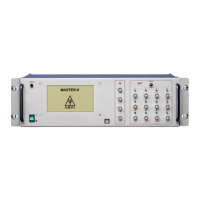

 To Next Page