NEED HELP? GIVE US A CALL 855.424.9892
14
INSTALLATION
Connecting Power
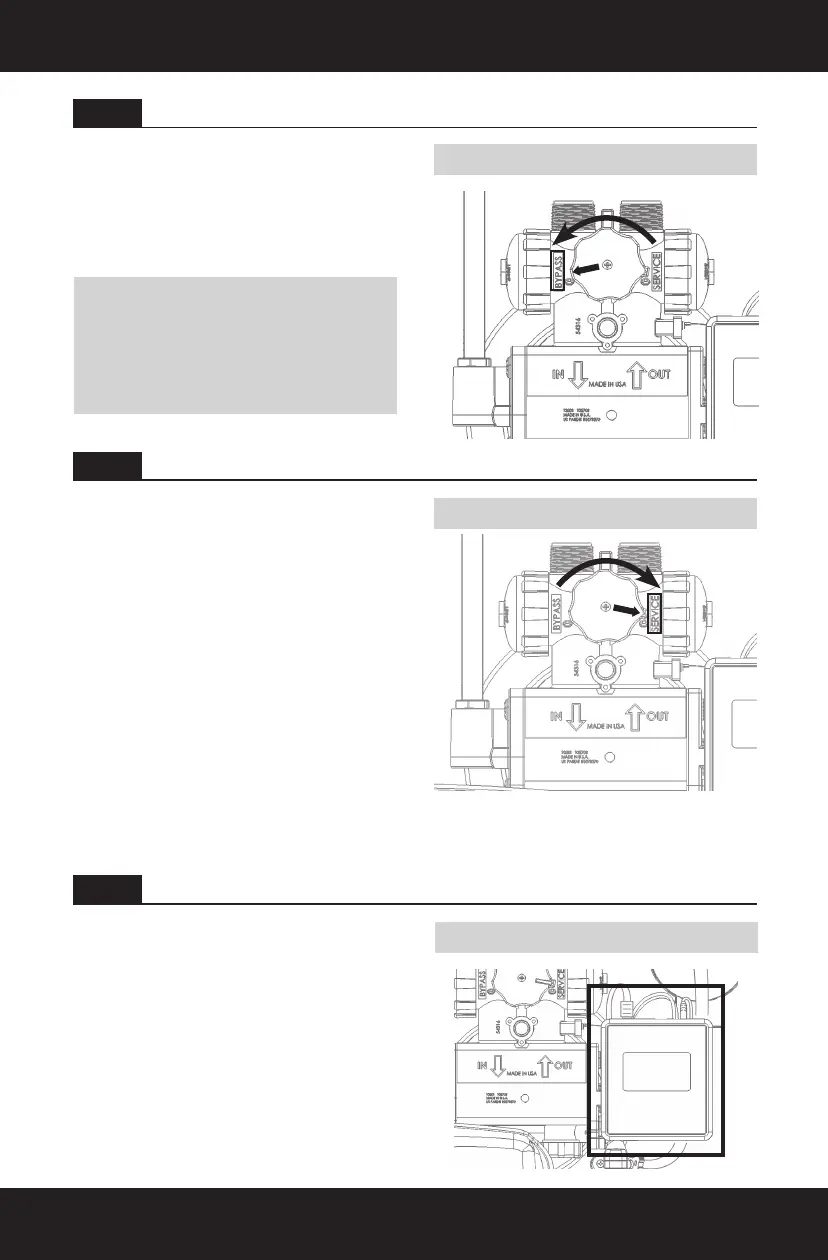
Bypass Position
Service Position
1. Place water softener in Bypass position.
Turn on main water supply.
2. Turn on nearest cold water faucet to ush
plumbing of any excess soldering ux,
air, or any other foreign material. Return
water softener to Service position.
1. Ensure the sensor wire and motor wire
are connected, then plug the transformer
power cord to the back of the controller.
(see Connecting Power)
2. Plug the transformer into an appropriate
outlet. Ensure the outlet selected is not
operated by an On/Off switch.
3. Program the water softener controller
in the next step.
Turn off all faucets. Check all lines
and connections for leaks.
If leaks are found:
• Turn off the main water supply.
• Turn on cold water faucet to
depressurize the lines.
• Turn off the faucet to eliminate
any siphoning action.
• Repair all leaks.
• Turn on the water supply.
• Place bypass in Service position
to slowly ll media tank. (see image)
• Turn on cold water faucet to purge
air out of media tank.
• Turn off the faucet and recheck for leaks.
STEP 7
STEP 9
STEP 8
Flush Lines
Plug in the Transformer
Check for Leaks
NOTICE: To prevent untreated water from
entering your home, avoid using water inside
your home when water softener is in Bypass
position. Remember to return to Service position
when you have nished ushing the system or
using untreated water.


 To Next Page
 Loading...