

EasyManua.ls Logo

A-rival SpoQ HR - User Manual

A-rival SpoQ HR
42 pages
Print Icon
To Next Page IconTo Next Page
Loading...
User Manual
Thank you for choosing an a-rival product. A good choice.
Just in case that you are facing any problems with your Device.
Please visit us at a-rival.de or contact our support:
- Mail: support@first-servicecenter.de
- Facebook:https://www.facebook.com/arivalpoweryourlife
- a-rival.de
You'll find Updates or actual information at our webpage:
www.a-rival.de
Question and Answer IconNeed help?

Do you have a question about the A-rival SpoQ HR and is the answer not in the manual?

Summary

User Manual Introduction

Getting Started

Safety Precautions

Essential safety warnings for users, especially regarding health.

Battery, Water, and Language

Battery Charging and Low Power

Procedures for charging the battery and managing low power states.

Smartphone Pairing Guide

Initiating Bluetooth Connection

Steps to begin pairing the watch with a smartphone via Bluetooth.

Pairing and App Integration

Linking Device and Confirming Pair

Selecting the watch in the app and confirming the pairing request.

App Setup and Syncing

User Information and Synchronization

Entering user data and syncing settings between app and watch.

Activity and Workout Tracking

Managing Workout Sessions

Starting, stopping, and saving workout data.

Sleep Tracking Details

Heart Rate and Disconnection

Disconnecting from Smartphone

Steps to sign out and sever the connection between watch and app.

Bluetooth Connection Management

Confirming Sign Out Process

Verifying the session termination in the app.

Device Pairing and Removal

Forgetting the Bluetooth Device

Removing the watch from the smartphone's paired devices list.

Watch Notifications

Sleep and Wake Notifications

Watch Configuration

Manual Setting Procedures

Guide for manually adjusting watch parameters.

Activity Goal Settings

Setting Target Speed or Pace

Defining speed or pace goals for training.

Activity and Time Management

Setting Watch Time

Methods for setting the watch's time using GPS or manual input.

Heart Rate Zone Configuration

HRM Zone Setup

Defining heart rate zones for training intensity levels.

Display and Night Mode Settings

Night Mode Operation

Timer Functionality

GPS Functionality

Acquiring GPS Signal

Steps to obtain a GPS signal for location tracking.

HRM and Run Mode Operations

Starting a Run Activity

Procedures for initiating and managing a running session.

Activity Recording Control

Managing Activity Sessions

Starting, stopping, taking laps, and saving exercise data.

Mode-Specific Displays

Exercise Recording Management

Starting, Stopping, and Saving Exercise

Procedures for recording and saving exercise data.

HRM and Chrono Mode Views

Chronograph Display Customization

Timer and Activity Management

Managing Timer Activities

Starting, stopping, and saving timer-based activity data.

Alarm Mode Configuration

Troubleshooting and Battery Care

Resolving Common Issues

Solutions for GPS signal problems and inaccurate heart rate readings.
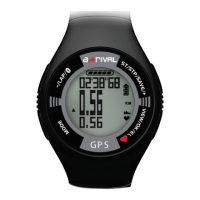
A-rival SpoQ HR Specifications

General IconGeneral
BrandA-rival
ModelSpoQ HR
CategoryWatch
LanguageEnglish