COMMUNICATION SETTINGS
CommLink 5 Technical Guide
6
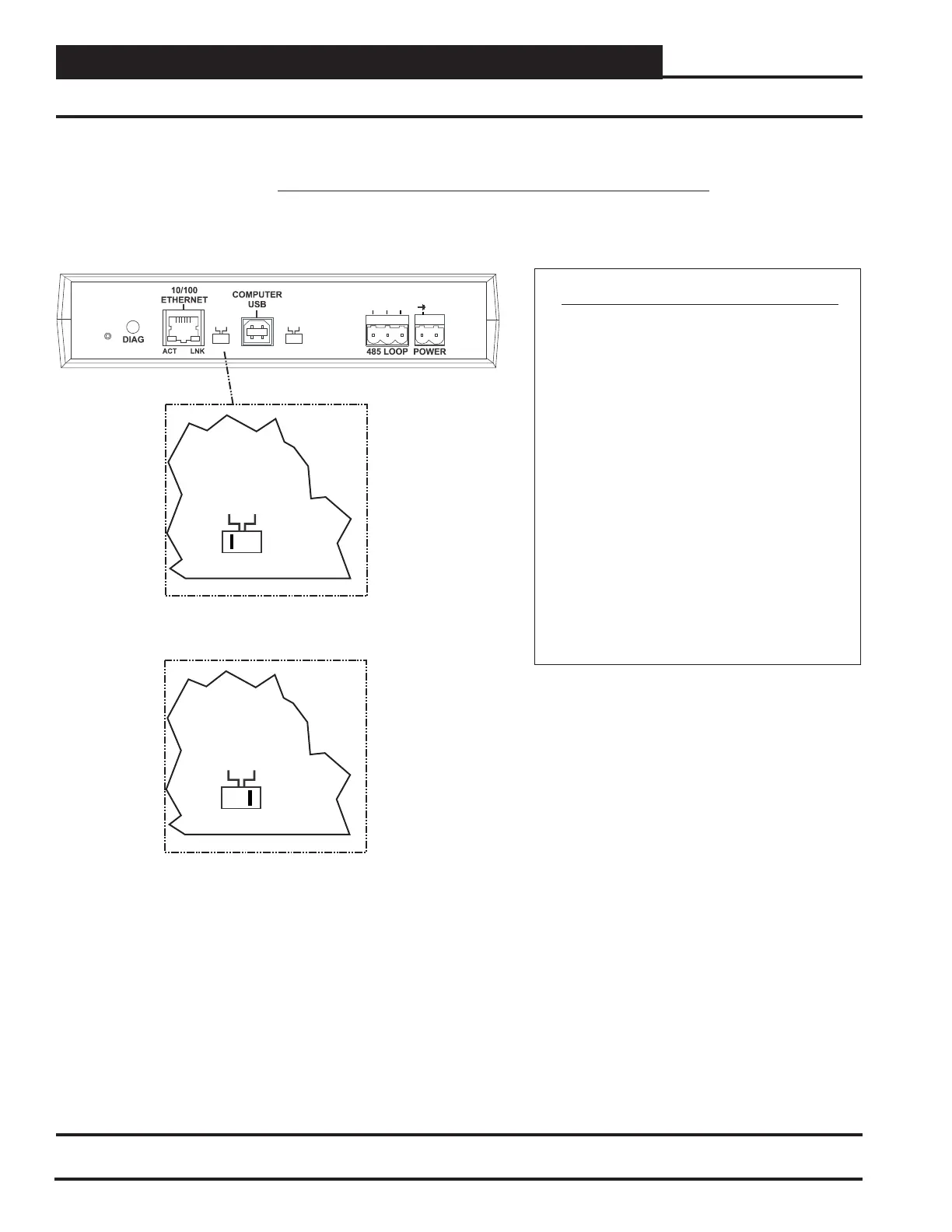
Loop Communication Setting
Setting the CommLink 5 SettingCommunications
CommLink 5 Communications Setting
The Loop Switch Located On The Back Of The
CommLink 5 Housing Must Be Set Correctly For
Your Specific Application In Order For The
CommLink 5 To Function Properly.
The Switch Setting Should Be Set To
“Multiple” In The Following Situation:
You Have A Single CommLink With
MiniLink(s) or MiniLink PD(s) Installed On
Your System.
The CommLink
5 Is Factory Set For Multiple Loop Applications.
Loop
The Loop Switch Setting Should Be Set To
“Single” In The Following Situation:
You Have A Single CommLink Without Any
MiniLinks Or MiniLink PDs Installed On Your
System.
MULTIPLE
HIGH
SINGLE
LOW
BAUDLOOP
R (+)
24V
GND
SHLD
T(-)
SERIAL #
MULTIPLE
SINGLE
LOOP
Switch Set To Multiple
Loop Communications
MULTIPLE
SINGLE
LOOP
Switch Set To Single
Loop Communications
Back of CommLink 5
Figure 2: Setting Loop Communications


 To Next Page