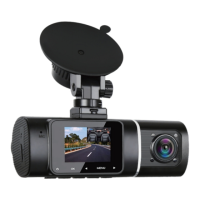
Mode Button【M】
1. Back function: return to the previous page.
2. Switching function: switch the Video/ Photo / playback mode;
Enter/Exit the MENU.
3. Lock function: press in video mode to lock/unlock the current
file.
UP Button【▶ 】
• In MENU, press to scroll up.
• In Playback, select to previous file.
• Press to switch between front/rear camera in the video standby
mode.
Ok Button 【OK/ 】
•Long press to turn on and turn off.
•Start/Stop recording.
•Starts playback while in Playback Mode.
•Selects option in MENU Mode.
•Select and play recorded files in Playback.
•During video recording, short press to turn on/off.
•Press to take a photo in Photo mode.
DOWN Button【◀ 】
•In MENU, press to scroll down.
•In Playback, select to next file.
•In Video recording Mode,press to turn on/off the recording
function.
•In Video recording Mode or Standby mode, long press to turn
on/off the Parking Monitor.
Menu Button 【☰】
•In Standby mode, Enter/Exit the Video Recording Menu /Setup
Menu.
• Enter/Exit the MENU
• In Video/ Photo / playback mode, short press to access the
menu settings for that particular mode.


 To Next Page