Need help?
Do you have a question about the ABB Robotics OmniCore C90XT and is the answer not in the manual?
This section provides general information about the manual's content, covering mechanical and electrical installation, maintenance, and repair.
Details on when and how this manual should be used for installation, maintenance, repair, and decommissioning tasks.
Identifies the target audience for this manual, including installation, maintenance, and repair personnel.
Outlines the necessary training and knowledge required for personnel working with ABB robots.
Lists related ABB documentation and their corresponding document IDs for further information.
Describes the different categories of user documentation provided by ABB Robotics.
Details the typical contents of a Product Manual for ABB Robotics hardware.
Explains the purpose of Technical Reference Manuals for robotics products.
Describes specific applications, software, or hardware options for ABB robots.
Focuses on hands-on operational aspects of products for operators, programmers, and troubleshooters.
Provides essential safety information, including limitations of liability and safety data.
Details safety signals used in manuals and safety symbols found on controller labels.
Explains robot stopping functions like emergency stop and protective stop, including stop categories.
Describes manual and automatic operating modes, including safeguard mechanisms and their functions.
Covers safety aspects and regulations for installing and commissioning the robot system.
Provides safety guidelines related to locking operating modes and handling safety actuators.
Details safety precautions for performing maintenance and repair activities on the robot.
Outlines safety considerations and special precautions for troubleshooting the robot system.
Provides information and procedures for safely taking the product or controller out of operation.
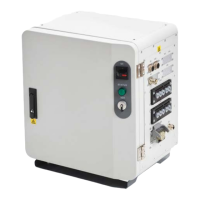
Introduces the OmniCore C90XT controller, its features, and applications.
Provides detailed technical specifications, dimensions, weight, and operating conditions.
Explains ESD sensitivity and safe handling procedures for electronic components.
Provides guidelines for safe handling, cleaning, and cabling of the FlexPendant.
Details security measures and responsibilities for connecting the product to a network.
Discusses the use of third-party and open-source software components within the ABB software.
Describes the ABB Ability™ controller hardware features, including data and connectivity.
Provides an overview of the installation process and emphasizes safety information.
Outlines the main steps involved in installing and connecting the controller.
Details procedures for safely lifting, unpacking, and storing the controller cabinet.
Covers requirements for installation space, mounting the FlexPendant holder, and electrical connections.
Explains how to connect cables and signals to the controller, including connector descriptions.
Describes the I/O system, including available fieldbuses and scalable I/O units.
Details the installation procedures for optional hardware components like harnesses and extension switches.
Covers the installation of add-on devices such as extension boxes and conveyor tracking modules.
Provides warnings and guidelines for installing external devices on the controller.
Describes the final function tests required to verify safety features before commissioning.
Outlines the recommended maintenance schedule, activities, and intervals for the OmniCore controller.
Details procedures for inspecting the controller, including checks on connectors, cabling, and fans.
Provides instructions for cleaning the air filter and the controller cabinet.
Describes activities related to replacing components, specifically the air filter.
Details function tests for various safety features and operating modes to ensure proper functionality.
Provides an introduction to repair activities, safety information, and required equipment.
Details procedures for replacing various components within the controller unit.
Describes how to replace specific parts located on the controller panels.
Covers procedures for replacing parts on the FlexPendant device itself.
Provides information on taking the product, robot, or controller out of operation.
Details product disposal guidelines, hazardous materials, and environmental symbols.
Offers general strategies and systematic approaches for troubleshooting robot system issues.
Lists common fault symptoms and directs users to specific troubleshooting procedures.
Provides guidance on troubleshooting specific units within the controller by examining LEDs.
General information complementing specific procedures within the manual.
Lists normative and other standards used in the design and operation of the product.
Provides a converter table for units used throughout the manual.
Lists the standard tools required for service, maintenance, and installation activities.
Details how to tighten various types of screw joints and specifies recommended tightening torques.
Explains how component weights are specified and recommends the use of lifting equipment.
Highlights the need for lifting accessories and refers to separate instructions for their use.
Categorizes ABB spare parts into L1 (field replaceable) and L2 (specialized training required).
Lists and illustrates various spare parts for the controller, including drives, power units, and harnesses.
Lists and illustrates spare parts specifically for the FlexPendant device.
Details spare parts for manipulator cables, including power and signal cables for different robot models.
Lists customer-specific cables with CP/CS connectors for various robot models.
Specifies customer Ethernet floor cables with RJ45 and X-code connectors.
 General
| Controller Type | OmniCore |
|---|---|
| Model | C90XT |
| Product Type | Robot Controller |
| Number of Axes | Up to 6 |
| Weight | Approx. 30 kg |
| Protection | IP54 |
| Payload Capacity | Up to 90 kg |
| Protection Standard | IP54 |
| Communication Protocols | Ethernet, PROFINET, EtherCAT, PROFIBUS, DeviceNet |
| Operating Temperature | 0°C to +50°C |
| Mounting | Floor, Wall |
| Category | Industrial |

 To Next Page