____________________________________________________________________________________________________________
V2 S500 Hardware 1-23 System Data S500 / Issued: 01.2007
5674
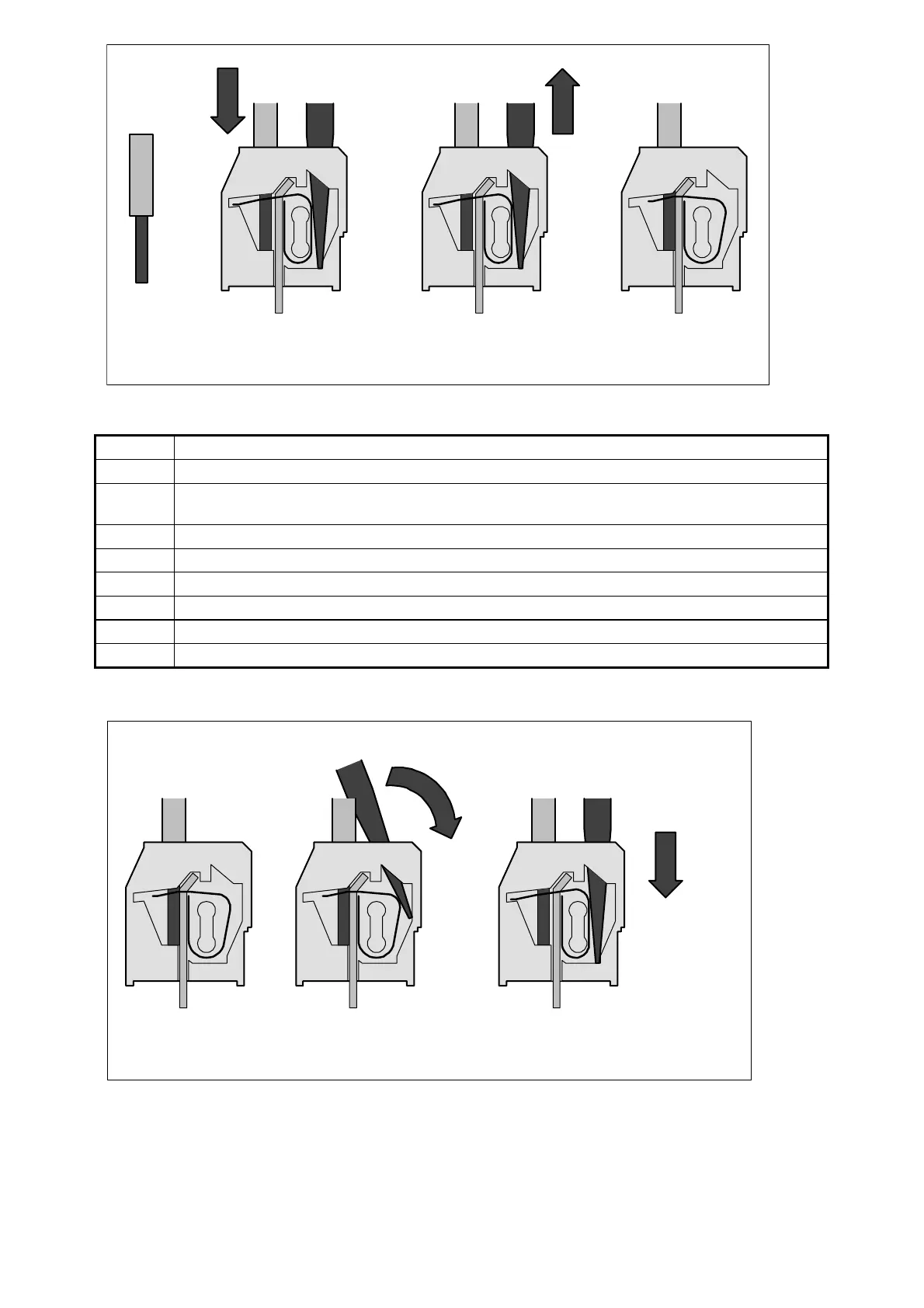
Figure: Connect the wire to the spring terminal (steps 4 to 7)
1 a Side view (open terminal drawn for illustration)
1 b The top view shows the openings for wire and screwdriver
2 Insert screwdriver (2.5 x 0.4 to 3.5 x 0.5 mm) at an angle, screwdriver must be at least 15
mm free of insulation at the tip
3 a While erecting the screwdriver, insert it until the stop (requires a little strength)
3 b Screwdriver inserted, terminal open
4 Strip the wire for 7 mm (and put on wire end ferrule)
5 Insert wire into the open terminal
6 Remove the screwdriver
7 Done
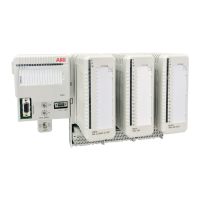
Disconnect wire from the spring terminal
23
Screwdriver
1
Screwdriver
Figure: Disconnect wire from the spring terminal (steps 1 to 3)


 To Next Page