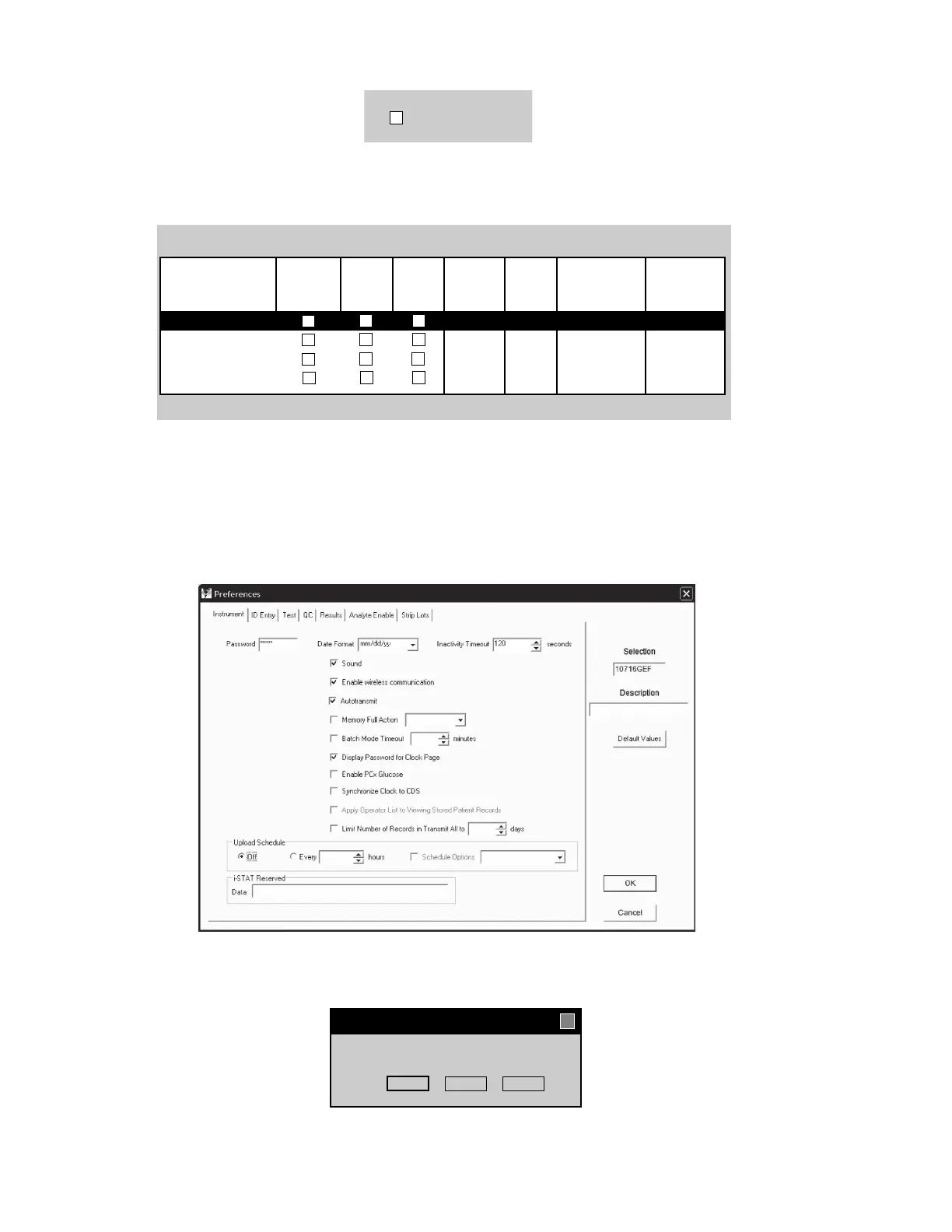
3. Make sure the Enable Customization box is checked.
A
lso, make certain that the Enable Updates box is checked for the particular location to which this i-STAT 1
Wireless Handheld is assigned.
4.
If the location to which this Handheld is assigned has a checkmark under the Use Default Profile column,
double click on the alphanumeric code under Preferences in the Default Customization Profile column.
Otherwise, double click on the alphanumeric code under Preferences for the specific location to which this
Handheld is assigned.
5.
Once the Preferences screen opens, click on the Instrument tab. Click the box to Enable wireless communication.
6. Click OK and answer YES to the question about changing the preferences.
Location-based customization profiles:
A_10.10.90.17
A_10.10.90.24
A_10.10.90.31
A_10.10.90.32
X
Location Enable Use Update i-STAT Philips Preferences STATNotes
Updates Default CLEW Analyzer BAM
Profile
CLEW
CLEW
A18
A18
A18
A18
DEFAULT0 CHART0
DEFAULT0 CHART0
DEFAULT0 CHART0
DEFAULT0 CHART0
¥
¥
¥
¥
¥
¥
¥
¥
¥
¥
¥ ¥
Preference Change Tools Window
X
You are changing the Preferences. Proceed?
Cancel
NoYes
U
!
➔
Art: 726025-01A4 Rev. Date 24-NOV-14














 To Next Page