Introduction of the BIOS 3-31
User’s Manual
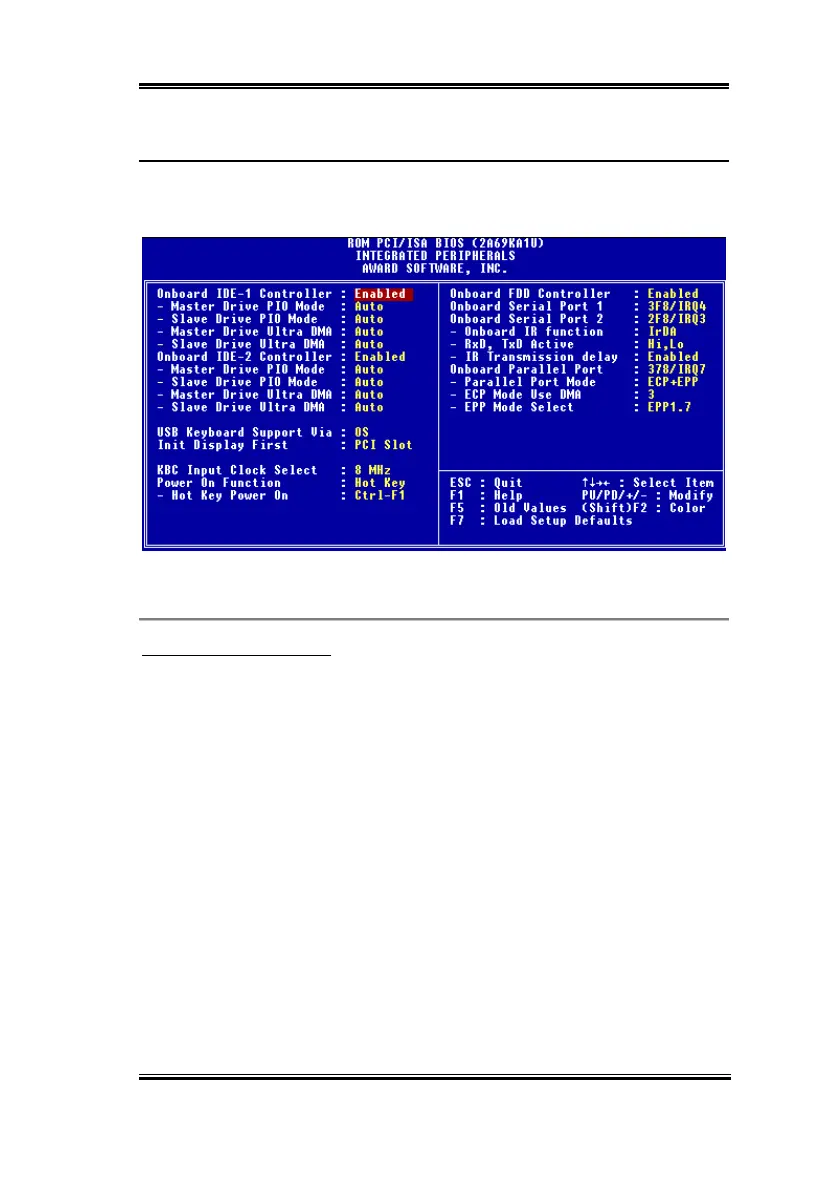
3-8. Integrated Peripherals
In this menu, you can change the onboard I/O device, I/O port address and other hardware
settings.
Figure 3-8. Integrated Peripherals Menu
Onboard IDE-1 Controller:
The onboard IDE 1 controller can be set as Enabled or Disabled.
✏
✏✏
✏
Master Drive PIO Mode:
➤
➤➤
➤
Auto: The BIOS can auto-detect the transfer mode of the IDE devices in order to set
its data transfer rate. (Default)
You can select the PIO mode from 0 to 4 of the IDE devices in order to set its data
transfer rate.
✏
✏✏
✏
Slave Drive PIO Mode:
➤
➤➤
➤
Auto: The BIOS can auto-detect the transfer mode of the IDE devices in order to set
its data transfer rate. (Default)
You can select the PIO mode from 0 to 4 of the IDE devices in order to set its data
transfer rate.
✏
✏✏
✏
Master Drive Ultra DMA:



 To Next Page