EasyManua.ls Logo

Abit NF-M2S - User Manual

Abit NF-M2S
32 pages
Print Icon
To Next Page IconTo Next Page
Loading...
NF-M2P
NF-M2S
NF-M2SV
Motherboard
AMD Socket AM2
Installation Guide

Questions and Answers

  • R
    Rhonda LeAug 7, 2025
    What to do if Abit Motherboard fails to boot up after assembly?
    • S
      sabrinahallAug 7, 2025
      If your Abit Motherboard fails to boot up after assembly, first, check the motherboard’s supporting specifications to ensure all key components meet the requirements. Then, remove all unnecessary add-on devices, leaving only the CPU, VGA card, DRAM, and Power Supply, and reboot. If the issue persists, try a different VGA card, memory module, CPU, or Power Supply.
  • D
    Douglas MorganAug 28, 2025
    What to do if Abit NF-M2S has malfunction in the OS after resuming from S3?
    • S
      sarah55Aug 28, 2025
      If you experience malfunction in the OS after resuming from S3 or testing programs on your Abit Motherboard, try upgrading to the motherboard’s latest BIOS version. Also, upgrade the add-on device’s latest driver version. Check for conflicts in the 'Control Panel/System Properties'.
  • T
    Tina NovakNov 16, 2025
    What to do if Abit NF-M2S Motherboard fails to boot up after overclocking?
    • S
      stewartronnieNov 16, 2025
      If your Abit Motherboard system fails to boot up after overclocking or non-standard BIOS settings, switch off the power supply unit and then switch it on again after one minute. If there is no power-switch, disconnect its power cord for one minute and then reconnect. Press and hold the key on the keyboard, and press the power-on button to boot up system. If it works, release the key and hit key to enter the BIOS setup page to apply the correct settings. Alternatively, locate the CCMOS jumper, change its position from default 1-2 to 2-3 for one minute to discharge the CMOS data, and then return it to its original position. As another option, follow the same procedure as with the CCMOS jumper, while discharging the CMOS data, pull out the ATX power connectors from the motherboard and remo...

Summary

Hardware Setup

Model Specifications

Details the specifications for NF-M2P, NF-M2S, and NF-M2SV motherboard models.

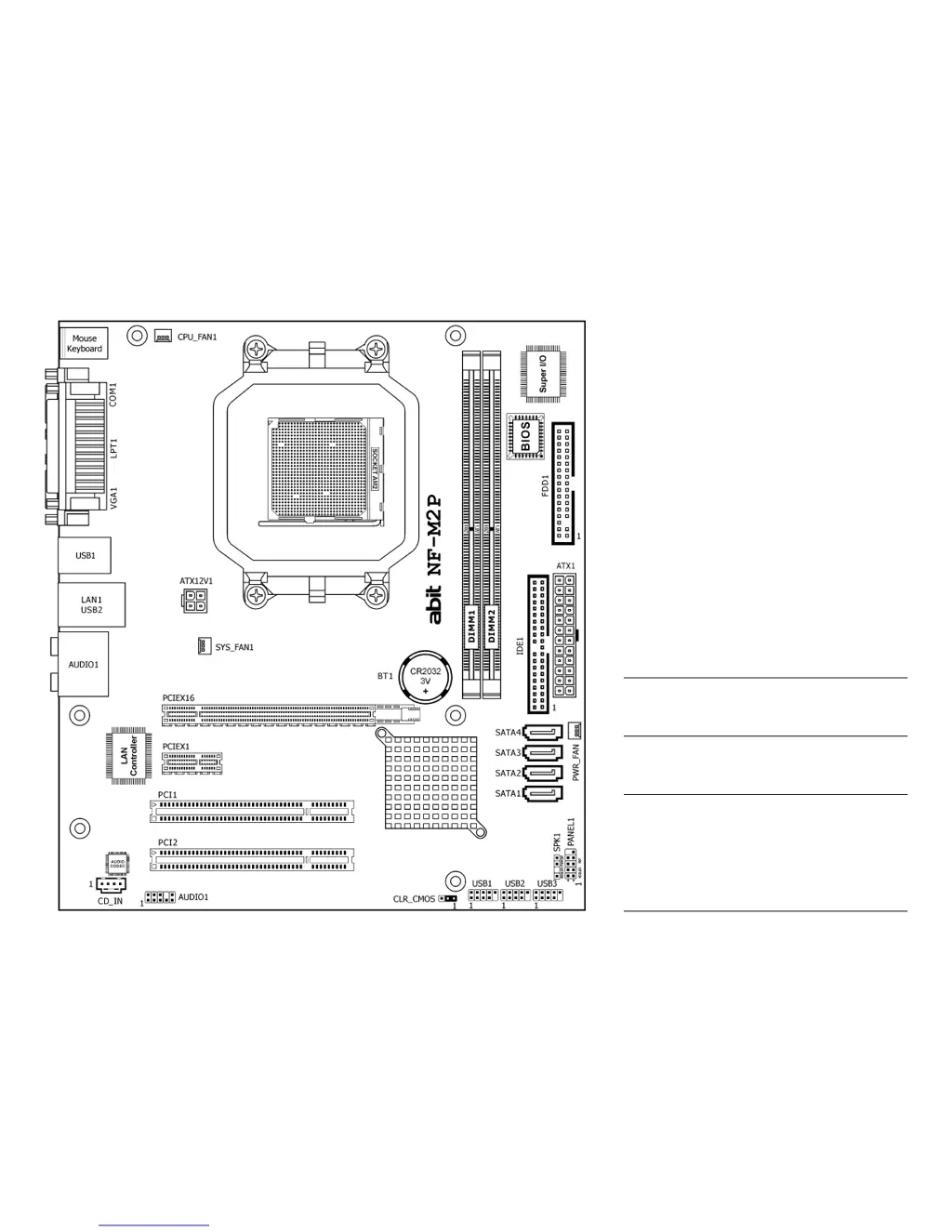
Motherboard Layout & Chassis

Visual guide to motherboard layout and chassis selection.

Installation Procedures

Step-by-step guide for installing the motherboard and related hardware.

Component Connection

Connecting chassis components, peripherals, CPU, memory, and I/O devices.

BIOS Setup

Driver & Utility

Appendix

Troubleshooting and Support

Guidance on resolving system issues and obtaining technical support.

Contact Information

Lists contact details for technical support and company offices worldwide.

Abit NF-M2S Specifications

General IconGeneral
Form FactorMicro ATX
Socket TypeSocket AM2
Memory TypeDDR2
Maximum Memory8GB
AudioRealtek ALC883 8-Channel HD Audio
LANRealtek RTL8201CL 10/100 Mbps
Expansion Slots1 x PCIe x16, 1 x PCIe x1, 2 x PCI
Storage Interface4 x SATA 3Gb/s
USB Ports8 x USB 2.0 (4 rear, 4 via headers)
Memory Slots4 x DIMM

Related product manuals