38
x) System
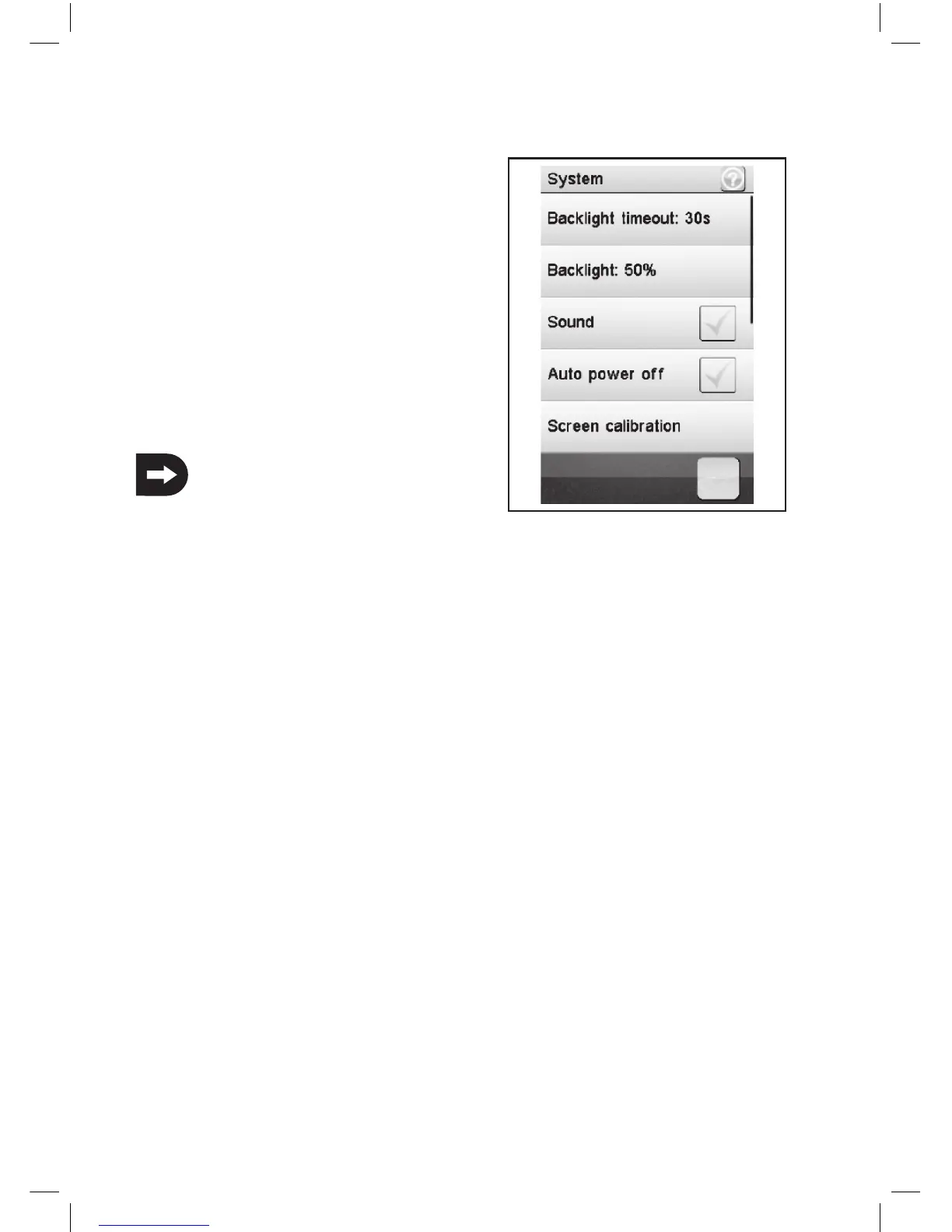
This menu allows different settings for your product.
„Backlight timeout“:
You can set the duration of the backlight of the LCD when it is
not touched.
„Backlight“:
This adjusts the brightness of the backlight for the LCD display.
A higher value makes for better recognition on the LCD screen,
and also for a rapid discharge of the battery.
„Sound“:
Here you can activate or deactivate the speaker or the product.
I If you deactivate the speaker, the product will give no
warning signals, if the battery voltage is to low.
.
„Auto power off“:
If the product is not about five minutes in use, an acoustic signal sounds. After another five minutes, the product will
shut down automatically. Put a check mark here to activate this feature.
„Screen calibrate“:
You can calibrate the screen display on the LCD screen.
„USB function“:
"ABS-iT 4 emulator" means that the product is connected to a PC and can be operated on this.
„Language“:
Here you can change the menu language of the product. The options are english, french and german
„Firmware update“:
You can arrange a firmware update. Therefor connect the product to a PC available via a Micro USB cable.
During the firmware update never remove the battery or the Micro USB cable. The product will lose its
functionality and can be rendered unusable.
„Factory reset“:
Here you can put the product back to the factory settings. All previous settings will be deleted.
„About ABS-iT4“:
This shows you the product to the latest firmware version.
Picture 35


 To Next Page