EasyManua.ls Logo

Abtus AVS-320 - Internal PCB Layout and Interconnection; Main Connections; Control and Power Ports

Abtus AVS-320
8 pages
Print Icon
To Next Page IconTo Next Page
To Previous Page IconTo Previous Page
Loading...
User Operation Guide
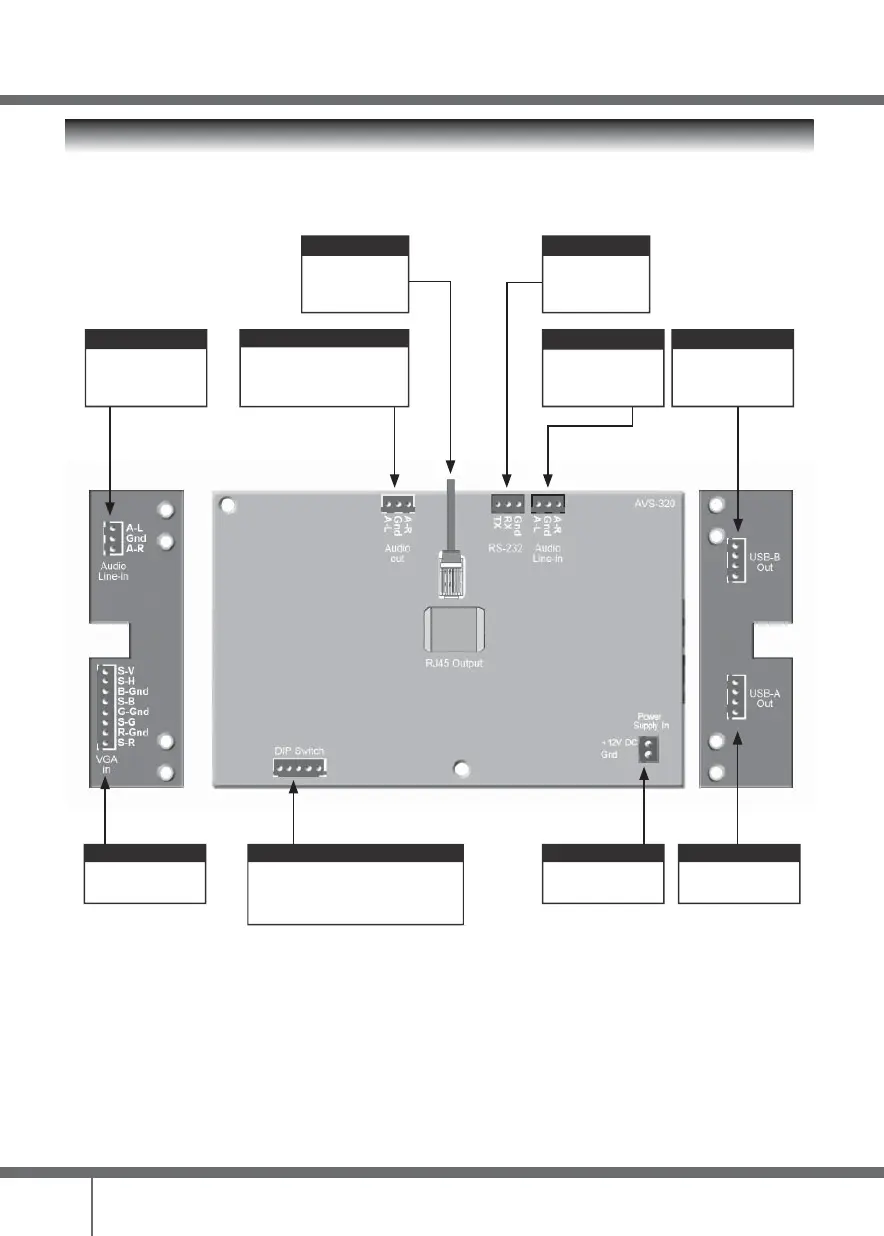
INTERNAL PCB LAYOUT AND INTER CONNECTION
Confi g Port
For confi guring
programming of the
“RS-232 TX Out”
RJ45 Output Port
Connect CAT5e/6/7
cable to receiver
CAT-HD11R/A2
PC-Audio In-1
Connect to PC-Audio
USB-B
Connect to Interactive
(HID) device
USB-A
Connect to USB-A
DC Power
Connect to 12V 1A
adaptor
PC-1
Connect to VGA 1
DIP Switch
Switch for preloaded programing modes
*See AVS-320 DIP switch setting table for
more information
Audio loop back
Audio loop back from
projector
Main Audio Output
Connected from “Audio In” of the
Multimedia Speaker System to
2RCA pigtail cable
4