EasyManua.ls Logo

Abtus AVS-320 - User Manual

Abtus AVS-320
8 pages
Print Icon
To Next Page IconTo Next Page
Loading...
Classroom
Media Controller
Model: AVS-320
Revision 30.08.2018
PRODUCT DESCRIPTION
PRODUCT HIGHLIGHTS
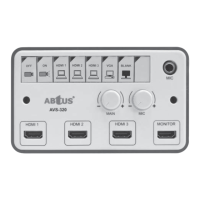
The ABtUS AVS-320 is a user friendy projector controller switcher that can handle multi
format inputs from various sources and controls the projector at the same time.
It consolidates all the input and output signals in a regular classroom and functions as a
central controller to make the classroom more organized and easier for teachers to manage.
Since it only require a single CAT-5e/6/7 cable, installation is usually quick and simple. It
also has a useful DIP switch that allows users to choose from a list of pre-programmed
projectors so there’s no need for complicated programing whenever, the user changes the
projector.
Single CAT5e/6/7 output allows for quicker and easier installations
Support Power over Cable (POC)
Support up to 20m with CAT-5e and up to 50m with CAT-6A
Supports USB (HID) , VGA and HDMI
Works well with any monitors, projectors and interactive system
Scan convert VGA input to HDMI
Simple to use, no training required
“User Programmable” with Window base Application Software
Question and Answer IconNeed help?

Do you have a question about the Abtus AVS-320 and is the answer not in the manual?

Summary

Product Description and Highlights

Product Description

Details the ABtUS AVS-320 as a user-friendly projector controller switcher with multi-format input handling.

Product Highlights

Lists key features like single CAT5e/6/7 output, POC support, and compatibility with various systems.

Turning On and Basic Operation Control

Power ON;OFF Buttons

Instructions for using the power buttons to turn the projector on and off, including warm-up/cool-down.

Microphone Input

Details the MIC IN port for connecting a 6.3mm microphone jack.

Receiver Connections

RS-232 Ports

Identifies RS-232 ports for controlling projectors 1 and 2.

HDMI Output

Specifies the HDMI OUT port for connecting to a projector or display.

UTP;STP Input

Describes the UTP/STP IN port for CAT-5/6/7 connection from the AVS-320.

Internal PCB Layout and Interconnection

Main Connections

Details connections for RJ45 output, PC-Audio, Main Audio Output, and USB ports.

Control and Power Ports

Explains connections for PC-1 (VGA), DIP Switch, DC Power, and USB-A.

Programming Instructions and DIP Switch Settings

Configuration COM Port

Details COM port settings for RS-232 communication, including baud rate and parity.

DIP Switch Settings

Provides a table for AVS-320 DIP switch settings for various projector models.

System Diagram and Specifications

System Diagram Overview

Illustrates the system connections between the AVS-320 and the receiver.

Input;Output Specifications

Lists detailed input/output types, VGA bandwidth, max resolution, and cable length.

Technical Specifications

Details control button protocols, LED indicators, volume/gain controls, power, housing, and weight.

Abtus AVS-320 Specifications

General IconGeneral
BrandAbtus
ModelAVS-320
CategoryController
LanguageEnglish