15
5. Solution to Operational Problems (cont.)
5.5 IR Sensor Calibration
If the detector is rejecting an unusual amount of bills, the equipment
may need to have the sensors calibrated.
1. Use conventional 75g office paper to print and cut the D470 IR
Calibration template to perform the calibration. Download the
template from www.accubanker.com/pages/support/D470.
2. Turn on the unit.
3. Pass the paper as if to scan a bill.
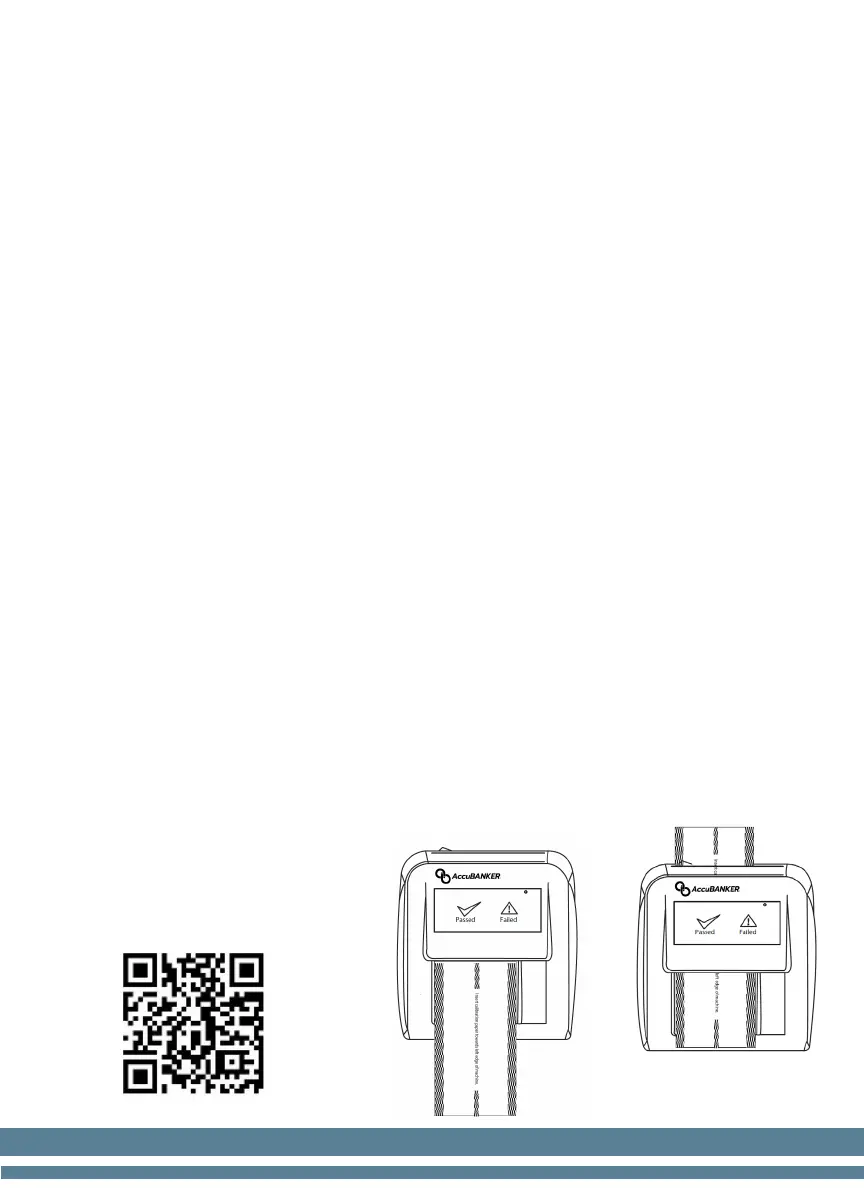
4. Place the paper all the way to the left edge of the equipment to
activate the feeding motor, but do not let the paper touch the feeding
belts. Keep the motor sensor activated for a few seconds until the
motor stops and emits a four-beep warning, then remove the paper.
(Figure 1)
5. Insert the paper into the detection channel this time as if scanning a
bill, the unit will begin flashing both indicators intermittently, keep
the paper inside for a few seconds while calibrating the IR sensors.
(Figure 2)
6. After the calibration is complete, the unit will give a two-beep
warning and turn off the red indicator.
7. Turn off the detector and remove the paper.
smartphone the QR Code


 To Next Page