9
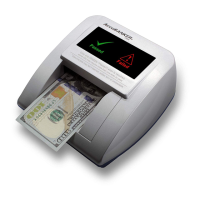
1. Connect the power cable to the detector and then connect the adapter to the
power outlet. When turning on the detector, it will proceed with a self-check
routine
that lasts 2 seconds. The display will light the green indicator ,
which means the equipment is ready to check the bills.
2. Insert the bill to be checked in any direction. When a bill is inserted
into the detector's feeding channel, an optical sensor located in this
compartment allows the detector to automatically begin the verification process.
The bill will be transported inside the unit and analyzed immediately.
will light up and sound
a single warning
will light up and
sound two warning
3. If the bill is genuine, the green indicator
beep.
4. If the bill is suspicious, the red indicator
beeps.
3. Operation
3.1 Basic Operation


 To Next Page