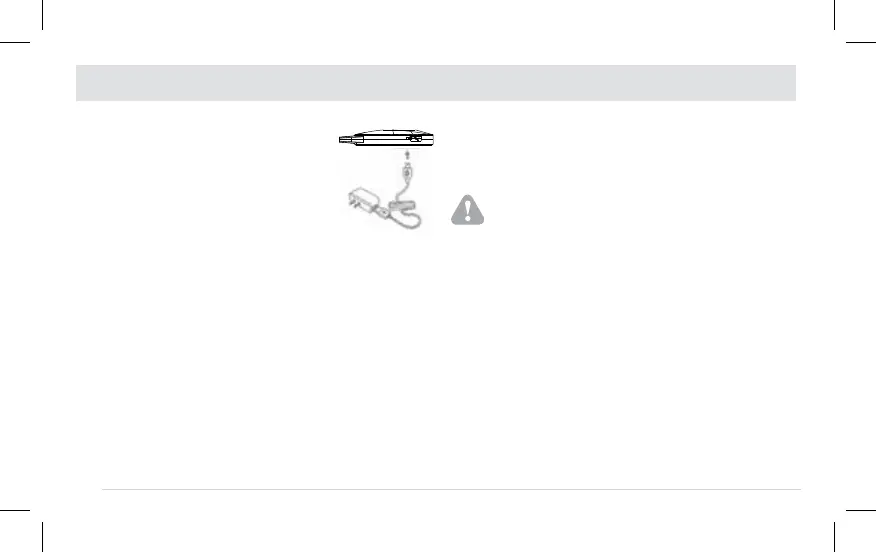
CHARGING
NOTES:
18
n Only use the Micro-USB cable which is
provided by the manufacturer.
n Device must be charged prior to first use.
Typically it takes 2 hours to charge the device.
A full charge allows a battery life of about 4
hours continuously when functioning in normal
(ambient temperature) conditions.
n Please charge the device fully before beginning
each session. If the charge is not complete at the
beginning of a program, the battery may become
depleted before the end of the session. You
cannot use the device while it is charging.
n If batteries leak and come into contact
with the skin or eyes, wash immediately with
copious amounts of water.
n Dispose of the used batteries safely according to
the local regulations.
n The life of a rechargeable battery depends on
the number of recharging/rundown cycles it
undergoes and how these cycles are performed.
The service life of rechargeable battery is more
than 300 recharging/rundown cycles. We provide
the following suggestions to extend the life of the
battery:
n Whenever the device is not used frequently, we
recommend recharging the battery once a month.
Insert the Micro-USB plug of the
Micro-USB cable into the Micro-USB
charging port of the ACRL-9100 device,
and then connect to the Standard
USB plug of the Micro-USB cable
to the appropriate power supply
device which could output 5V d.c. ,
300mA.When the battery light goes from
continuous orange (which means that the
battery is being charged) to a continuous green
(the battery is full), remove the micro-USB plug
from the micro-USB socket of the device.
WARNING:


 To Next Page