16
Stepper Function
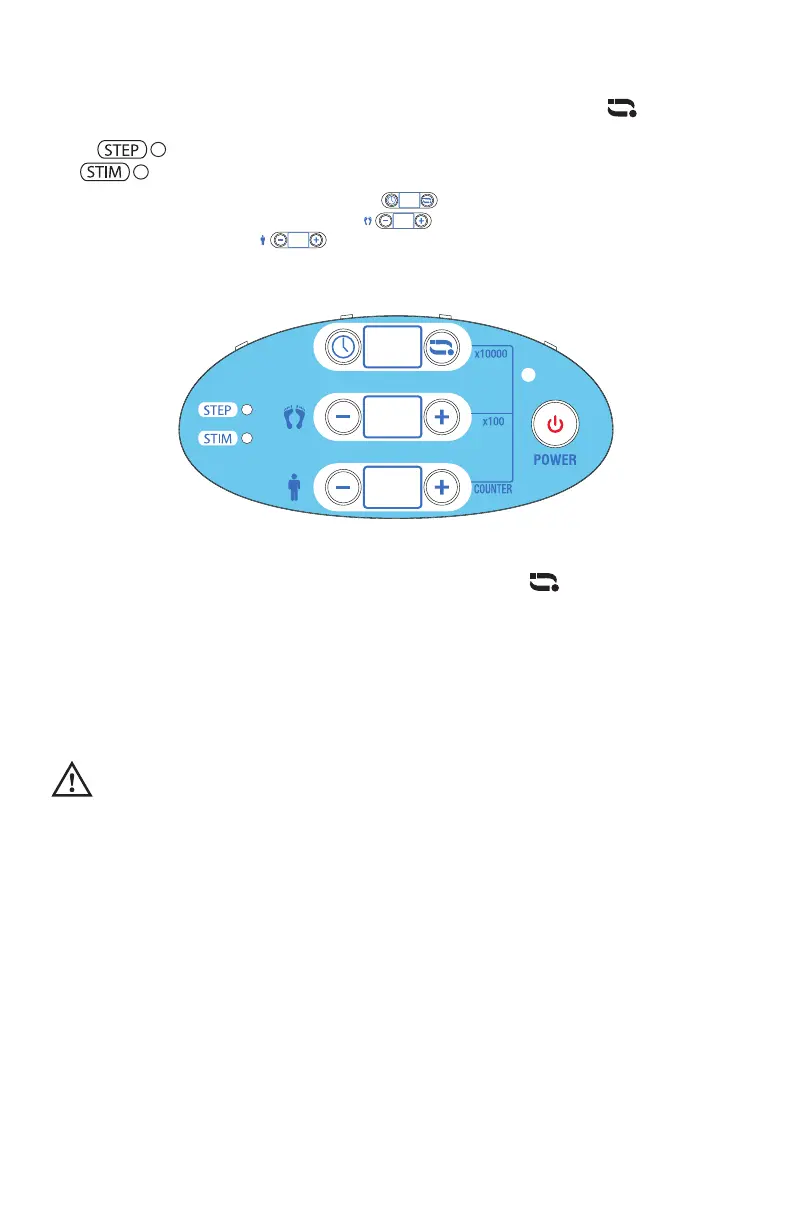
Tilt your feet back and forth during the treatment. You can press [ ] to shift
the display of modes between Stepper and Stimulation. When the STEP LED is
lit ( ), the LCD displays your # of steps. When the STIM LED is lit
( ), it displays treatment time and intensity for stimulation.
For exact amount of steps done, the [ ] LED multiplies your steps by
10,000. The number displayed on [ ] LED multiplies your steps by
100. The number on [ ] LED displays steps up to 99. For example,
the below LCD display, the steps are “303711” which means your feet tilted
back and forth “33,711” times.
Warning: If you press any other button than [ ] while
in STEP mode, it will affect the stimulation settings (if
stimulation is active).
Remote Control
The remote control allows you to sit back and relax without having to bend over
to operate the device. It is important to always aim the remote control towards
the digital display on the device, as this is where the receiver is located.
CAUTION
1. Remove the batteries if the remote control is not being used for a long period
of time.
2. Do not mix old and new batteries or different types of batteries.
3. Warning: If batteries leak and touch your skin or get into your eyes, wash
with large amounts of water immediately.
4. Keep batteries out of reach of children.
5. Do not use rechargeable batteries. Remove depleted batteries from the unit.
30
11
37


 To Next Page