14
Body Stimulation ( )
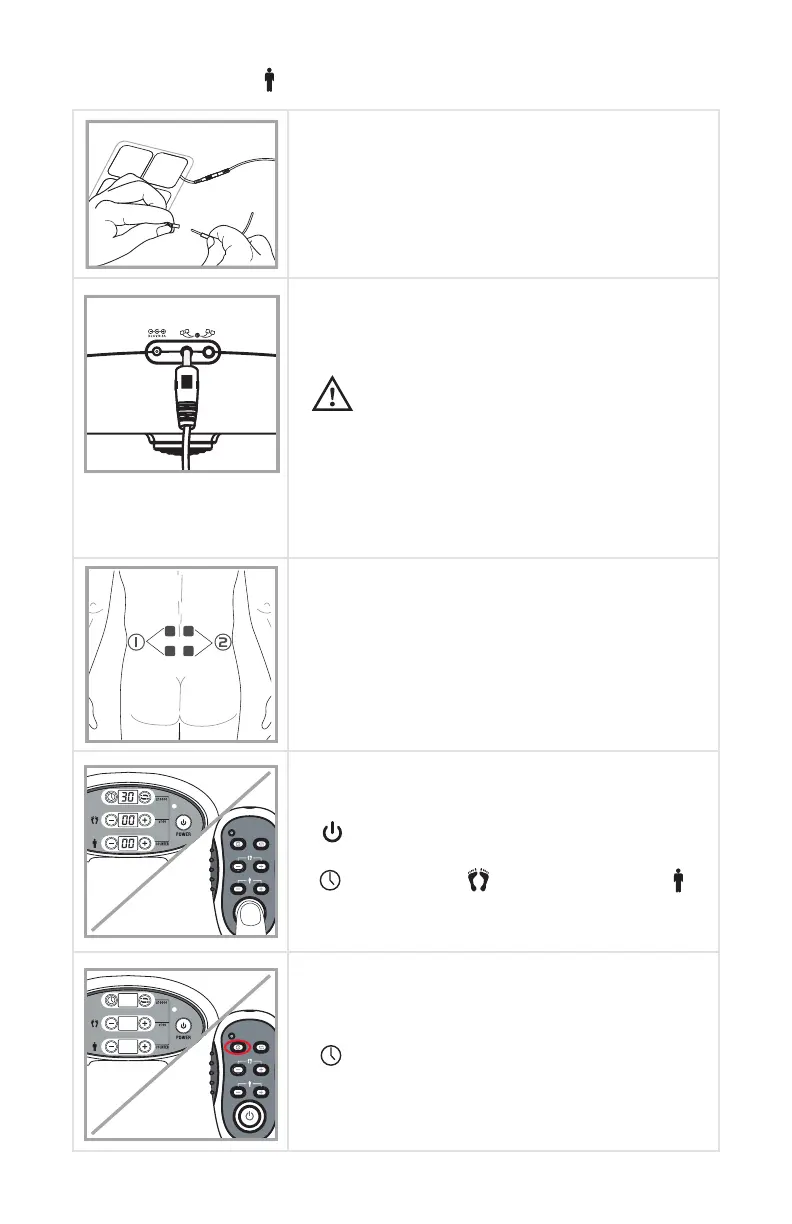
Step 1 - Attach pads to the lead wire
Take the pads out of the sealed package; insert
the pin of the lead wires into the pigtail of the
electrode pads. Make sure there are no bare
metal pins exposed.
Step 2 - Insert lead wires to the device.
Hold the lead wires plug and insert into the
socket on the back of the AccuRelief Ultimate
Foot Circulator.
CAUTION
• Ensure that your AccuRelief Ultimate Foot
Circulator is turned OFF.
• You can use one or two channels according to
your need. If using only one channel (2 pads) it
must be plugged into socket labeled #1.
• But you must always use at least two pads for
stimulation.
Step 3 - Pad placement
Remove the pads from the clear plastic
film. Place pads on clean, dry and healthy
skin near or surrounding the specific body
part (as pictured). For more pad placement
suggestions, refer to page 19-20 of
“ACCURELIEF PAD PLACEMENT GUIDE”
Step 4 - Turn on the device
To turn on the device. Press the power button
[ ] on the device or use the remote control.
In the default setting, the display lights will read
[ ] 15 minutes, [ ] 00 output intensity, [ ]
00 output intensity.
Step 5- Setting the treatment time
Using either the remote control or buttons on
the device, set the treatment time by using the
[ ] buttons.
The treatment time is adjustable between 5, 10,
15, 30, 60 and 90 minutes as a cycle.


 To Next Page