5. RAID
User Guide
4.1.5 Email Notification
It may be necessary for network administrators to receive e-mails in the event of errors, alerts,
and changes to the RAID array. These alerts can be e-mailed to a maximum of 20 e-mail
addresses.
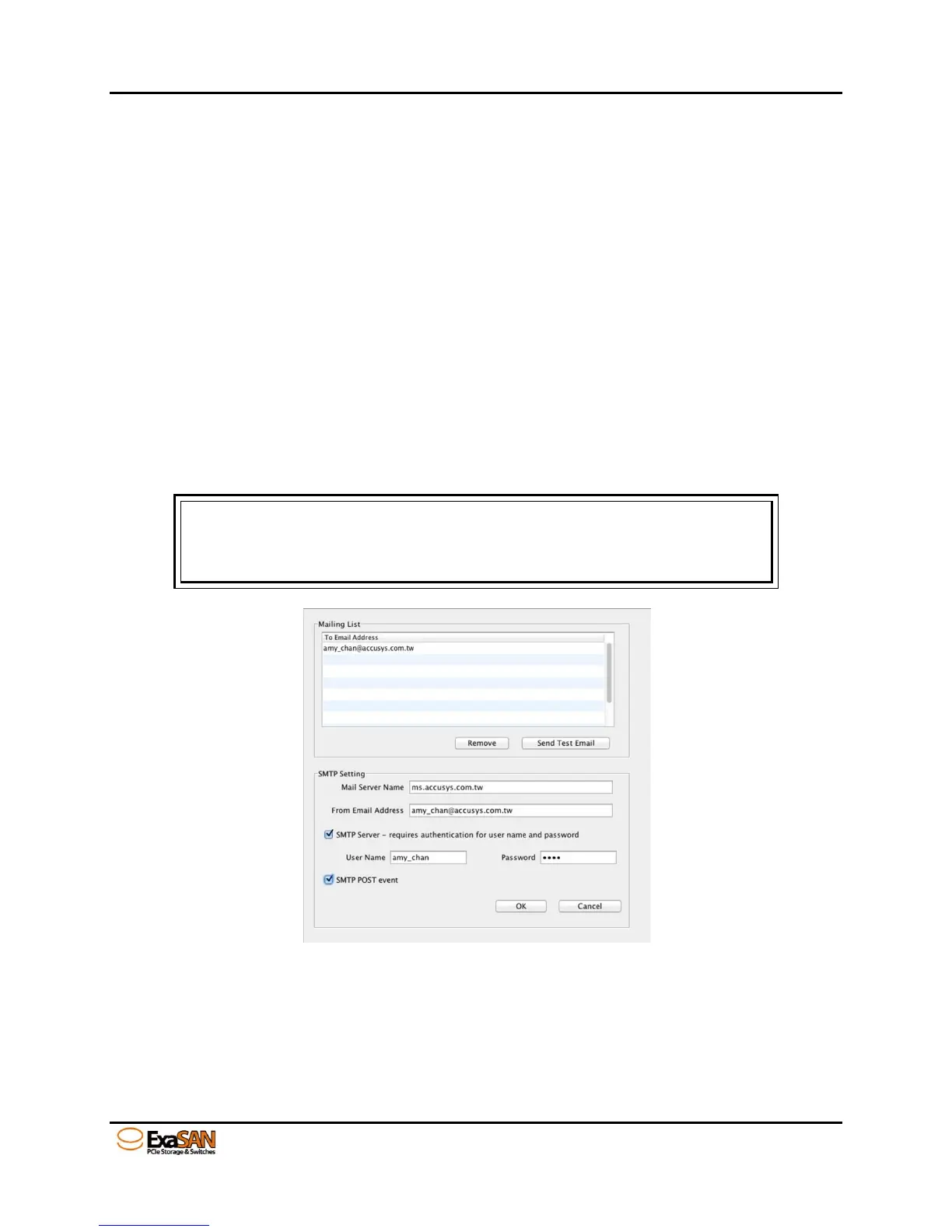
Mailing List
Enter the e-mail address(es) of people to receive controller error reports.
Click Remove to delete e-mail addresses from the list.
Click Send Test Email to check that the e-mail is working.
SMTP Setting
Mail Server Name – Enter the address of the mail server.
From Email Address – Enter the e-mail address of the mail server.
SMTP Server – requires authentication for user name and password
Check this box if your mail server requires a user name and password.
SMTP POST event
Check this box if wish to create a log for error events.
Note
1. Ask your systems administrator for SMTP Server details.
2. Not support outbound SMTP mail service, e.g. Gmail, Hotmail, Yahoo.
3. Contact to tech support for more detail.


 To Next Page