---------------------------------------------------------------------------------------------------------
Note:
1. VRB set "On", when to turn on AMD FreeSync, will auto set VRB is "O".
2. VRB set "On", when to adjustment (Brightness, Blue Light, ACM), will auto
set VRB is "O".
3. VRB function does not aect the (Logo, Aim Point, Message and Input Icon)
brightness.
4. VRB setting "On", when detection of Input Timing <75Hz, will auto o the
VRB and gray out to disable.
5. VRB = (Normal or Extreme), because the IC control dynamic picture is
cleaner, so the overall Brightness will be dark, "Extreme" will be darker than
“Normal”.
7. Refresh rate num: Display the panel’s current refresh rate on the screen.
-----------------------------------------------------------------------------------------------------------
Note:
If AMD FreeSync set "On" you can see the V Frequency to changes in the
OSD.
OSD
Mode - Standard
10
English
OSD Timeout
Picture
Color
Language
Off
Transparency
Enter
Move
Exit
Off
OSD Lock
OSD
System
Save Se�ngs to...
Audio
Pertormance
X
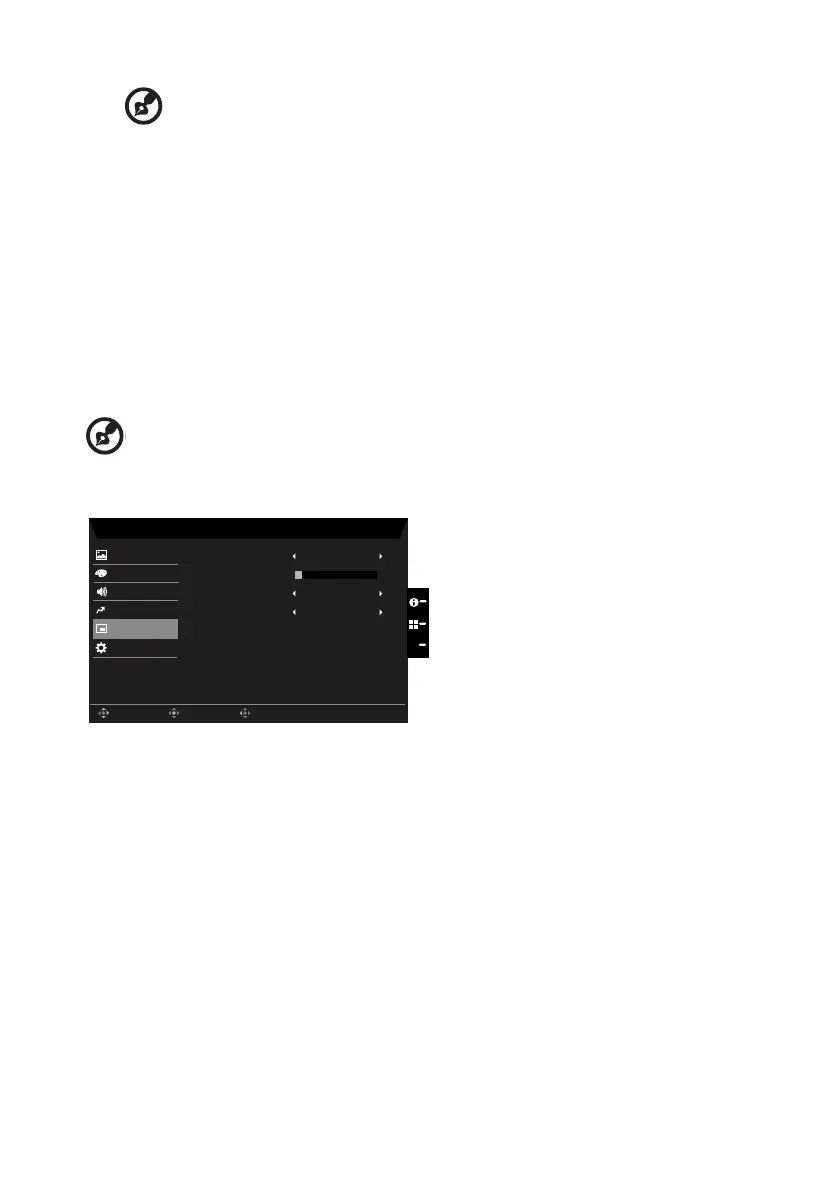
1. Press the MENU key to open the OSD.
2. Toggle the joystick to the up or down to select OSD from the OSD.Then toggle to the
right to
navigate to the element you wish to adjust and press the joystick to enter it.
3. Toggle to the left or right to adjust the sliding scales.
4. Language: Set the OSD menu language.
5. OSD timeout: Adjust the delay before turning o the OSD menu.
6. Transparency: Select the transparency when using gaming mode. The transparency
can be 0% (OFF), 20%, 40%, 60%, or 80%.
7. OSD Lock:To choose OSD lock on/o.



 To Next Page