EasyManua.ls Logo

Acer CB282K - Installation

Acer CB282K
34 pages
Print Icon
To Next Page IconTo Next Page
To Previous Page IconTo Previous Page
Loading...
English
Installation
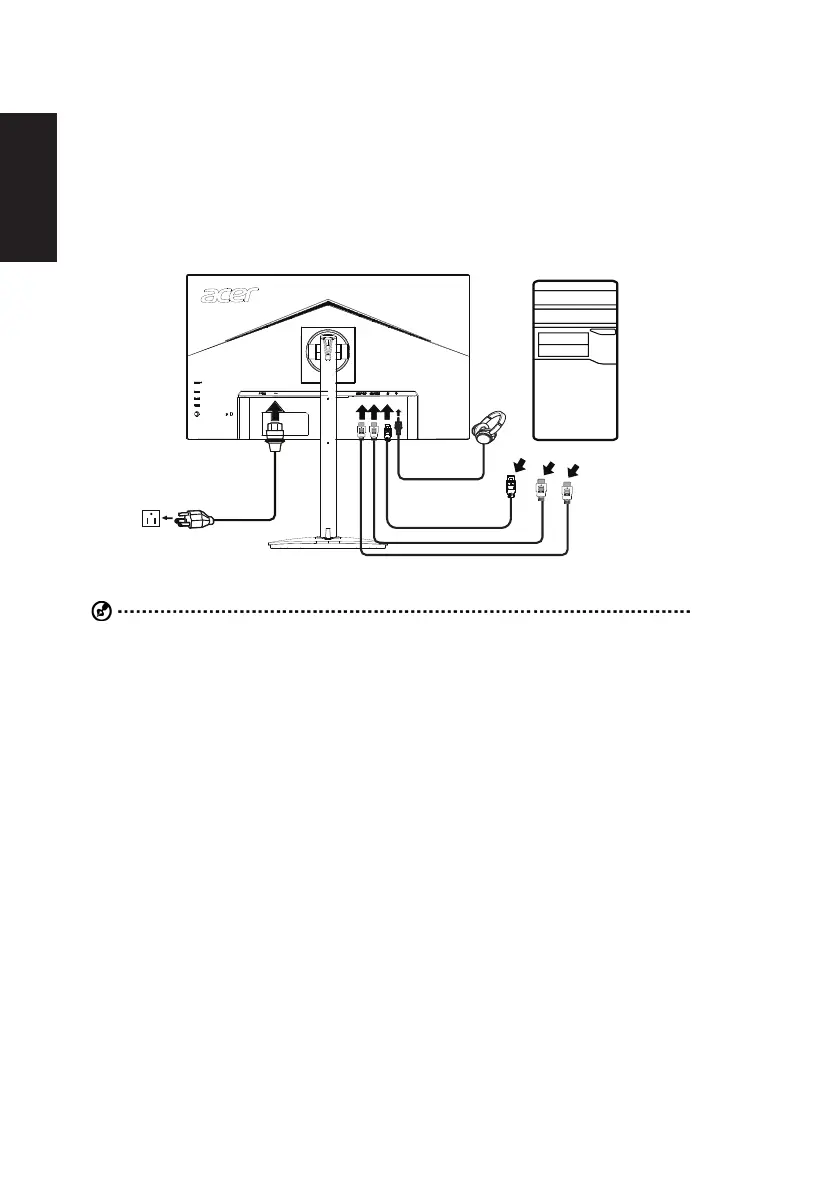
1. Turn off your computer and unplug your computer's power cord.
2. 

thumbscrews on the signal cable connector.
3. 
the audio cable.
4. Insert the monitor power cable into the power port at the back of the monitor.
 Connect the power cord to the monitor, then to a properly grounded AC outlet.
Note: Audio output is only for audio output model. Please check user manual for more instruction.

*For the installation of replaceable parts, please refer to the above installation instructions.

For local service centers and service contacts, please refer to https://www.acer.com/ac/en/US/content/support


Other manuals for Acer CB282K

Related product manuals