English
Using the Shortcut Menu
-------------------------------------------------------------------------------------------------------------
Note:
may vary.
position and general settings. For advanced settings, please refer to following page:
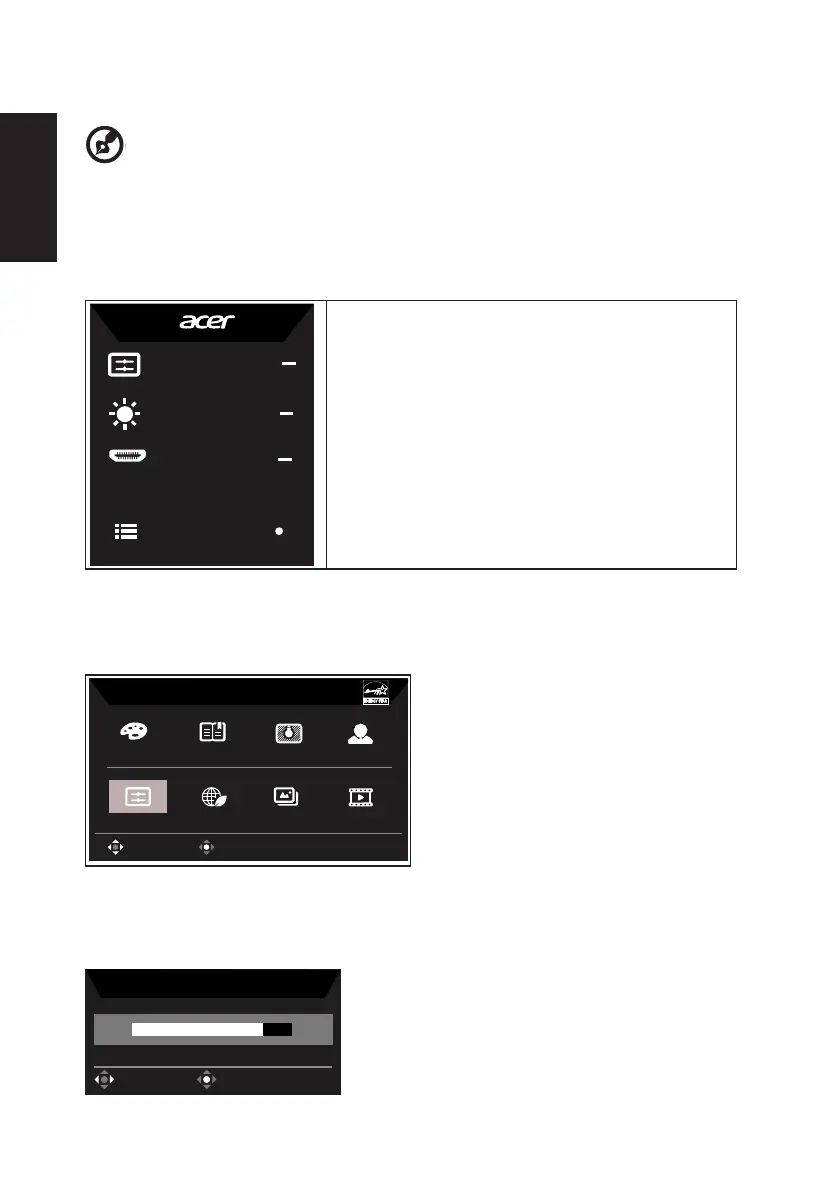
Main page
Mode
Standard
Brightness
80
Input
HDMI
Menu
1. Hot Key1
Contrast, Blue Light, Over Drive
2. Hot Key2
Gamma, Blue Light, Over Drive
3. Hot Key3
Input Switch Hot Key
4. Main Menu
Hot key1 (default: Standard mode)
sRGB
Reading
Darkroom
User
Movie
Graphics
ECO
Standard
Modes
OK
Move
Hot key2 (default: Brightness)
Open the Brightness control and select your preferred brightness setting . When you are
done, press the joystick to quit current page and store.
Brightness
80
OK
Adjust



 To Next Page