Special keys and indicators
The special keys and indicators provide easy access to handy features and clear
status information.
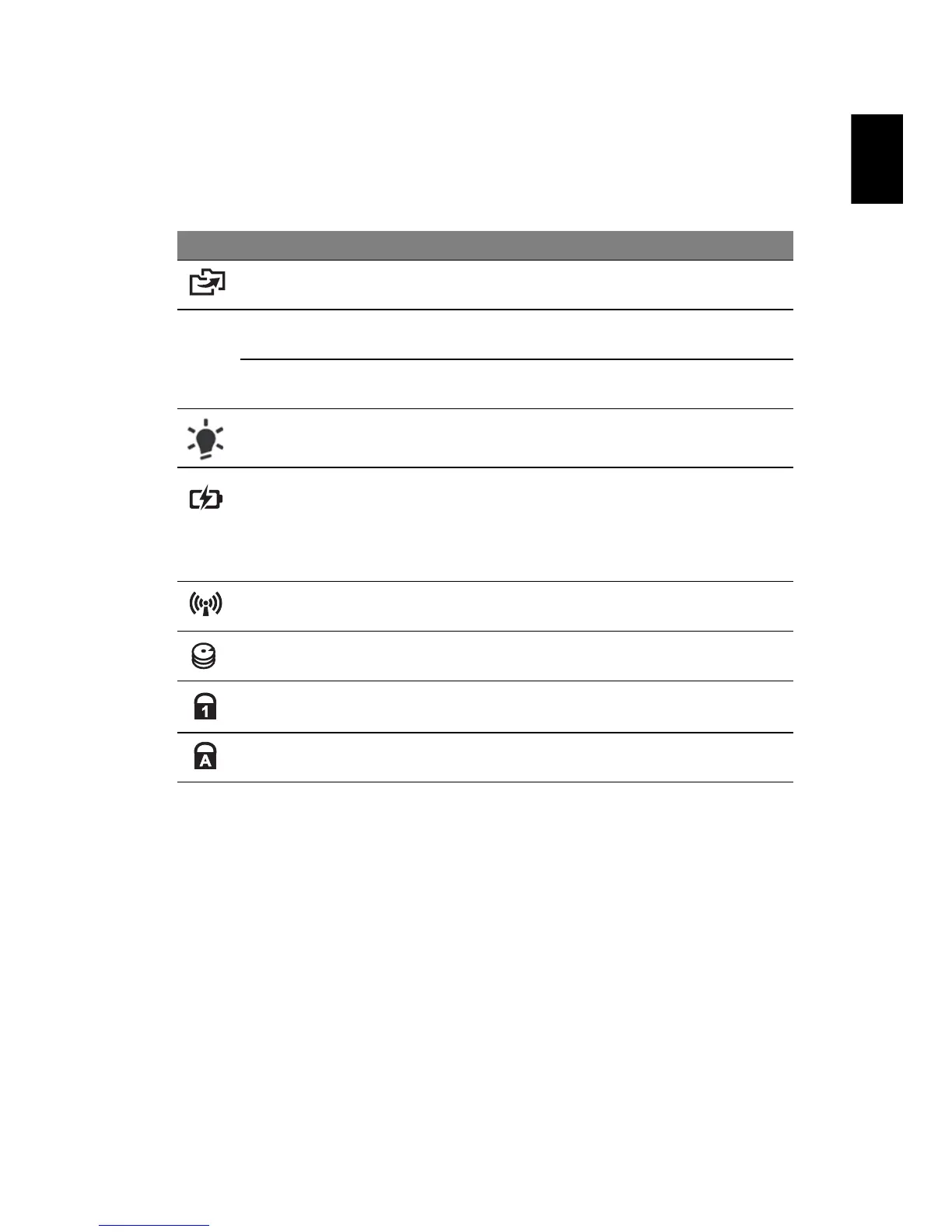
Icon Item Description
Backup key Launches eMachines Backup Management for
three-step data backup (only for certain models).
P
PowerSmart key Puts your computer into power-saving mode
(only for certain models).
Programmable
key
User-programmable (only for certain models).
Power indicator Indicates the computer's power status.
Battery indicator Indicates the computer's battery status.
1. Charging: The light shows amber when the
battery is charging.
2. Fully charged: The light shows blue when in
AC mode.
Communication
indicator
Indicates the computer's wireless connectivity
device status.
HDD indicator Indicates when the hard disk drive is active.
Num Lock
indicator
Lights up when Num Lock is activated
(only for certain models).
Caps Lock
indicator
Lights up when Caps Lock is activated
(only for certain models).


 To Next Page
 Loading...