5
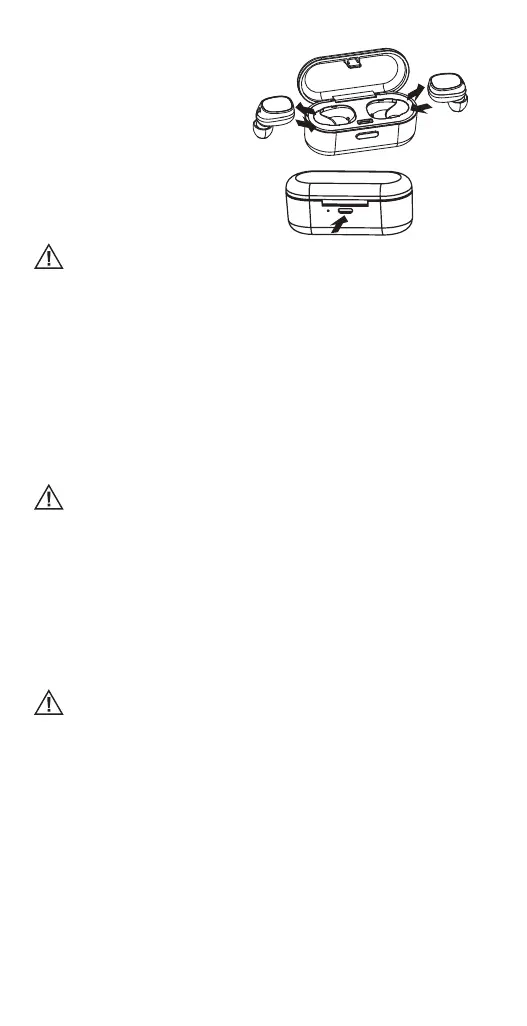
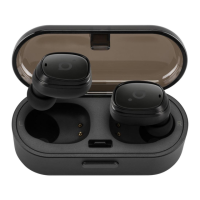
• Puttheearphones in the charging
case and close the cover to charge.
During charging, the indicators will
show a steady red colour. When the
battery is fully charged, the red light
will turn o.
• UsetheUSBchargingcableto
charge the charging case. The
indicator light of the charging case
is red when being charged. It will
turn o automatically after being
fully charged.
Fully charged earphone batteries have the power for up to 2 hours of
playback time (4 hours more from the charging case). When the batteries are
running out of power, a voice prompt will be heard. This indicates that the
earphones need to be charged as soon as possible.
Pairing
Automatic (with the charging case) method:
• Removethetwoearphonesfromthechargingcase*andwaitfor10seconds.Thetwo
earphones will power on and enter to the pairing mode automatically. A fast-blinking
red/blue LED light on the right earphone and a slowly-blinking blue LED light on the
left one will indicate that the earphone is ready to pair with your device.
• TurnontheBluetoothfunctiononyourdevice,selectBH410fromthelist,andpair
the earphone.
• Avoicepromptwillbeheardfromtherightearphonesayingthattheearphonesare
connected.
*The charging case must be closed tightly before opening it and removing
the earphones.
Manual (without the charging case) method:
• Whenbothearphonesareinanostate,pressandholdthepower(multifunction)
button of both for 3-4 seconds. A voice prompt will be heard from both earphones
saying that left and right channels are successfully connected. Then a voice prompt
will be heard saying which earphone is the left one (“left channel”) and which is the
right one (“right channel”), and after that in the right earphone you will hear the voice
prompt of pairing.
• TurnontheBluetoothfunctiononyourdevice,selectBH410fromthelist,andpair
the devices.
• Avoicepromptwillbeheardfromtherightearphonesayingthattheearphonesare
connected.
If pairing is successful, the earphones will enter to an idle mode and the blue
lights will ash once every 5 seconds in dierent earphones. If no Bluetooth
connection is made within 10 minutes, the earphones will turn o
automatically.
Basic Use
To switch on, when both earphones are in an o state, press and hold the power
(multifunction) button for 3 seconds for both earphones at the same time until the blue
indicator light ashes 3 times with the sound prompt.
To switch o, when both earphones are in an on state, press and hold the power
(multifunction) button of one earphone (left or right) for 3 seconds to power o both
earphones until the red indicator light ashes 3 times with the sound prompt or just put
them back into the charging case.
Automatic reconnection
When both earphones are in an o state, remove them from the charging case at the
same time, and they will reconnect automatically. And the right (main) earphone will
reconnect to the paired device automatically.
Answer a call
When there is an incoming call, press the power (multifunction) button on the right
(main) earphone.


 To Next Page