6
While making phone calls, only the right (main) earphone produces sound.
Reject a call
To end the call, press and hold the power (multifunction) button on the right (main)
earphone for 2s.
End a call
To end the call, press the power (multifunction) button on the right (main) earphone.
Play/Pause
Double tap the power (multifunction) button to pause the song. Single press to play
the song.
Increase/Decrease volume
Short press the right earbud to increase the volume. Short press the left earbud to
decrease the volume.
Next/Previous song
Press and hold the right earbud to change song to next one. Press and hold the left
earbud to change song to previous one.
Voice assistant
Double tap left earbud and the smartphone’s assistant will appear. After prompt sound
you can ask any question and the answer will play to the earphones.
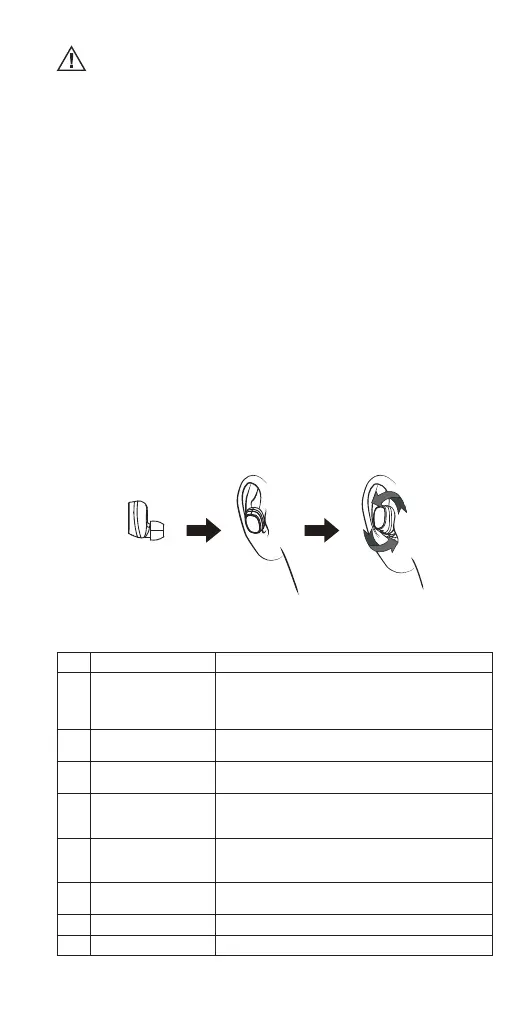
Wearing the earphones
To properly wear the earphones:
STEP 1. Place the earphones in the ears as shown.
STEP 2. Slightly rotate the earphone until it gets tight.
LED indications
No. Status Headset Performance
1 Pairing The indicator light of the right earphone ashes
red and blue alternately; when successfully
connected to the device, the indicator light
ashes blue once every 5 seconds.
2 Standby mode The indicator light of the right earphone
ashes blue every 5 seconds.
3 Call state In case of the incoming call, the indicator light
of the earphone ashes red every 5 seconds.
4 Headset charging state The indicator light of the headset is red
when being charged and will turn o
automatically after being fully charged.
5 Charging case
charging state
The indicator light of the charging case is
red when being charged and will turn o
automatically after being fully charged.
6 Power on state The indicator light ashes blue 3 times and
then ashes red once every 5 seconds.
7 Power o state The indicator light ashes red 3 times.
8 Low battery alarm The indicator light ashes red once every 20 seconds.


 To Next Page