8A
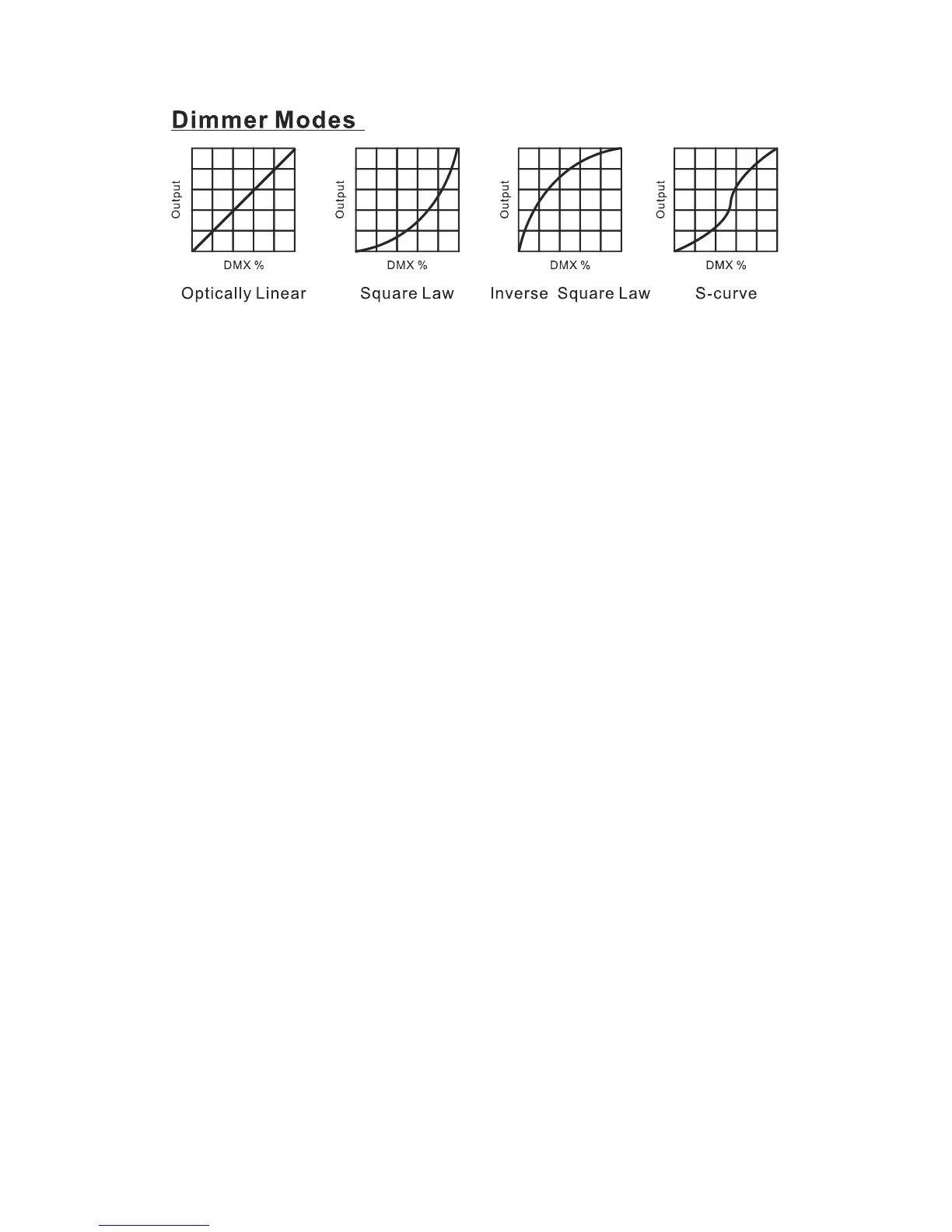
Mode1(OpticallyLinear):
TheincreaseinlightintensityappearstobelinearasDMXvalueisincreased.
Mode2(SquareLaw):
Lightintensitycontrolisfineratlowlevelsandcoarserathighlevels.
Mode3(InverseSquareLaw):
Lightintensitycontroliscoarseratlowlevelsandfingerathighlevels.
Mode4(S‐cure):
Lightintensitycontrolisfingeratlowlevelsandhighlevelsandcoarseratmediumlevels.
SoundState
ToselectSoundState,presstheENTERbuttontoshowtheSOUNDSTATEonthedisplay.Usethe
DOWN/UPbuttontoselecttheOn(turnontheSoundMode)orOff(SoundModeoff).Oncethe
modehasbeenselected,presstheENTERbuttontosetup,togobacktothefunctionswithoutany
changepresstheMENUbuttonagain.PressandholdtheMENUbuttonforaboutonesecondor
waitforoneminutetoexitthemenumode.
SoundSense
ToselectSoundSense,presstheENTERbuttontoshowtheSOUNDSENSEonthedisplay.Usethe
DOWN/UP button to adjust the sensitivity level, the sensitivity level can be adjusted between 0
(thelowest)and 100(mostsensitive).Pre ssandholdthe MENUbuttonforabout onesecondor
waitforoneminutetoexitthemenumode.
BlackOut
To select Black Out, press the ENTER button to show the BLACK OUT on the display. Use the
DOWN/UP button to select the Yes (blackout) or No (normal). Once selected, press the ENTER
button to setup, to go back to the functions without any change pressthe MENU button again.


 To Next Page