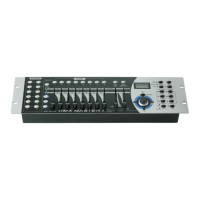
3. Overview
3-1. Front View
CA-1612J
CA-1612W
Page 3
2. Use the Bank Up/Down button to select the DMX channel
01-16 to assign to MIDI channel.
3. Press and hold down the MIDI/Rec button for three seconds
to store your setting and to deactivate MIDI setting.
To cancel your setting, tap any other button (except Bank
Up/Down buttons) to exit MIDI mode.
4-7.2 Implementation
This unit receives Note On signals, which enables to run 15 banks(01-15) of
scenes and 6 chases of scenes. In addition, blackout function can be activated
by MIDI signal.
BANK NOTE NUMBER FUNCTION
Bank 1 00 to 07 Turn on or off Scenes 1-8 of Bank 1
Bank 2 08 to 15 Turn on or off Scenes 1-8 of Bank 2
Bank 3 16 to 23 Turn on or off Scenes 1-8 of Bank 3
……….. ………. ………………………
Bank 14 104 to 111 Turn on or off Scenes 1-8 of Bank 14
Bank 15 112 to 119 Turn on or off Scenes 1-8 of Bank 15
Chase 1 120 Turn on or off Chase 1
Chase 2 121 Turn on or off Chase 2
Chase 3 122 Turn on or off Chase 3
Chase 4 123 Turn on or off Chase 4
Chase 5 124 Turn on or off Chase 5
Chase 6 125 Turn on or off Chase 6
126 Blackout Page 28


 To Next Page
 Loading...