Dimmer Speed
To select Dimmer Speed, press the ENTER button to confirm. Use the UP/DOWN button to select
Fast or Smooth, press the ENTER button to store. Press the MENU button back to the last menu or
let the unit idle 30 seconds to exit menu mode.
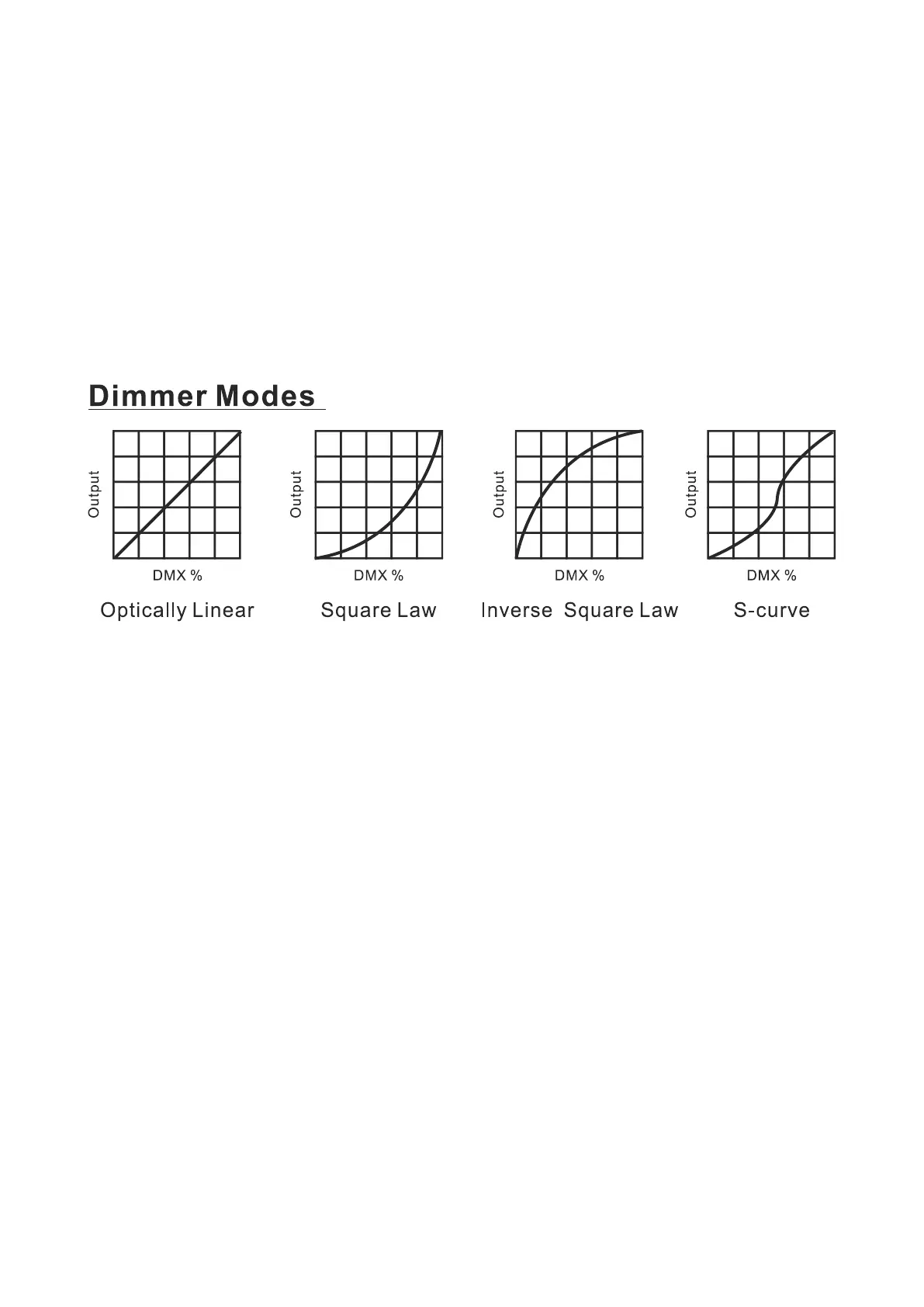
Dimmer Curve
To select Dimmer Curve, press the ENTER button to confirm. Use the DOWN/UP button to select
Linear, Square Law, Inv SQ Law or S Curve, press the ENTER button to store. Press the MENU button
back to the last menu or let the unit idle 30 seconds to exit menu mode.
Optically Linear: The increase in light intensity appears to be linear as DMX value is increased.
Square Law: Light intensity control is finer at low levels and coarser at high levels.
Inverse Square Law: Light intensity control is coarser at low levels and finger at high levels.
S-Curve: Light intensity control is finger at low levels and high levels and coarser at medium levels.
Cooling Mode
To select Cooling Mode, press the ENTER button to confirm. Use the UP/DOWN button to select
Auto or Quiet, press the ENTER button to store. Press the MENU button back to the last menu or let
the unit idle 30 seconds to exit menu mode.
Display Settings
To select Display Settings, press the ENTER button to confirm, use the UP/DOWN button to select
Display Invert, Backlight Intensity, Temperature Unit or Language.
Display Invert
Select Display Invert, press the ENTER button to confirm. Use the UP/DOWN button to select No
(normal display) or Yes (invert display), press the ENTER button to store. Press the MENU button
back to the last menu or let the unit idle 30 seconds to exit menu mode.
11C










 To Next Page