2
03
4.1
Software introduction
4
06
05
1
4 4 4 4 5
4 4 4 4 4 4 4 4 4 2
4 4 4 4 3
4 4 4 4 4
4 4 4 4 6
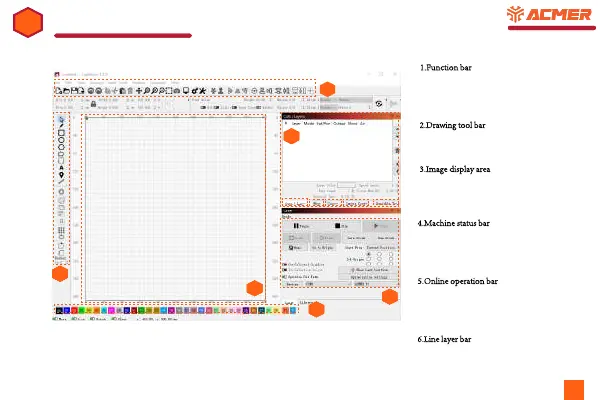
1.Function bar: Here you can open or save the
software, adjust the parameters of the software,
including the language, and the basic parameter
settings of your device.
2.Drawing tool bar
: Here, you can use the graphics
tools of the software to create the graphics or text
you want.
3.Image display area
: Place the picture or figure
you want to engrave in this area, and the area size
corresponds to the actual engraving range of your
device.
4.Machine status bar
: There are many windows in
this area. You can see the real-time instructions of
the machine operation, the basic parameters and
line layers of the graphics you want to carve, etc
5.Online operation bar
: In this area, you can
operate your machine online, such as starting
or stopping engraving, predicting engraving
borders, etc
6.Line layer bar
: Select different line layers for
your graphics to adjust different parameters



 To Next Page