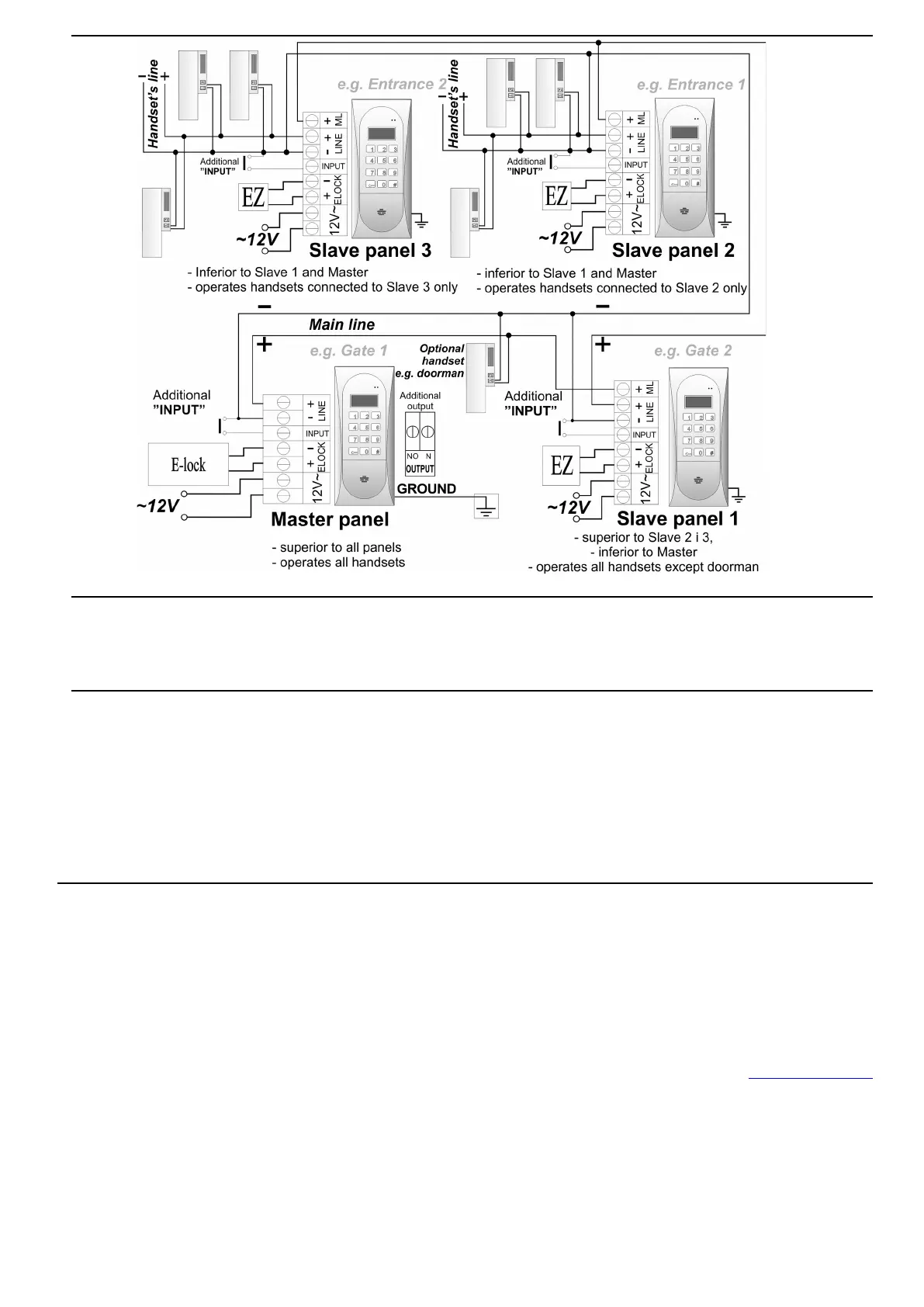
TWO & MORE CDNP OUTSIDE UNITS WIRING DIAGRAM
MOUNTING AND CONNECTING UNIPHONES
Uniphones should be connected according to the installation manual. The connections should be made with
paying particular attention to the settings numbers in the uniphone decoder and proper (polarisation)
connection to the “LINE”terminals of the panel.
ADJUSTING SOUND VOLUME
The volume level settings shall be made after obtaining the connection with the uniphonein the following
way:
- the ”MIC” knob, adjusts the panel's microphone sound volume
- the ”SPK” knob, adjusts the speaker's microphone sound volume
- the ”SOUNDS” knob, adjusts the panel's sound volume
After setting these values, establish the position of points in which the excitation (beeping)in the
loudspeaker takes place by turning the ”BALANCE” with the potentiometer, and set the potentiometer
halfway between these points.
OPERATION
When idle, "Intro" is displayed on the screen ("aco" by default). "Intro" can be changed as desired. By
default, we can call numbers from 1 to 255, which corresponds directly to the physical adresses set in the
receivers (we can switch dialing numbers from the keypad from 1 to 999, maintaining the continuity of
physical addresses from 1 to 255). Calling is by selecting the apartment number using the keypad buttons
or if the 230E module is present, you can select the entry with the "arrows" and press the "bell" button. After
approx. 3 seconds the receiver in the selected apartment will ring. If the call is answered in the ring mode,
you can talk and open the door. Opening the door with the user (tenant) code consists in using the
keyboard to select the apartment number to which the code is assigned, confirming with the "key" button
and selecting the four-digit code. In order to print the full table of user codes or ready business cards for
tenants together with the instructions for use, use the "ACO Code Generator" available at www.aco.com.pl
in the user area ("download"). For each "Master" control panel, the code table is factory-set on the back of
the device as a 4-digit number, and for "Slave" devices, enter the same table as in "Master". Opening the
administrator code consists in selecting the "key" button followed by a six-digit code. The administrator code
is intended for building’s administrators, e.g. technical services, postmen, house owners, etc. The door will
also be opened after shorting the additional INPUT to ground. For devices equipped with the ACC proximity
reader (CDNP6ACC), opening will occur after presenting the proximity card or proximity tag (tenant or
administrator / installer) stored in the device. If the card / key fob is not stored, you will hear a triple "beep"
in the speaker. When opening the door, the display shows "Enter!" Activation of the OUTPUT (only Master)
will take place after pressing the F2 button on the receiver (during the conversation) or after entering the
user code - press the "key" twice before entering the same code as for basic opening. When using ACC, the



 To Next Page
 Loading...

