second output will be activated by pressing the "key" button and presenting the proximity card or key fob
stored into the device. While the output is active, the display will show "Out-2".
PROGRAMMING
Entering the installer menu: press the "key" button and enter "1507xxxx" within 5 seconds, where "xxxx" is
the four-digit Installer Password, which is factory set to "0000" and must be changed to your own! (menu 7 -
the current password must be entered again first). Confirmation of entering the installer menu is a sound si-
gnal, the appearance of the software version on the display and then the program number 0: "Open". The
menu is changed with the buttons "2" up and "8" down. Enter the currently displayed menu and entering val-
ues is confirmed by pressing the "Key" button. In the installer mode, it is possible to reset (restart) the panel
by pressing simultaneously buttons 7 and 9. While exiting the installer menu (by pressing the "#" button),
the current temperature inside the control panel is displayed.
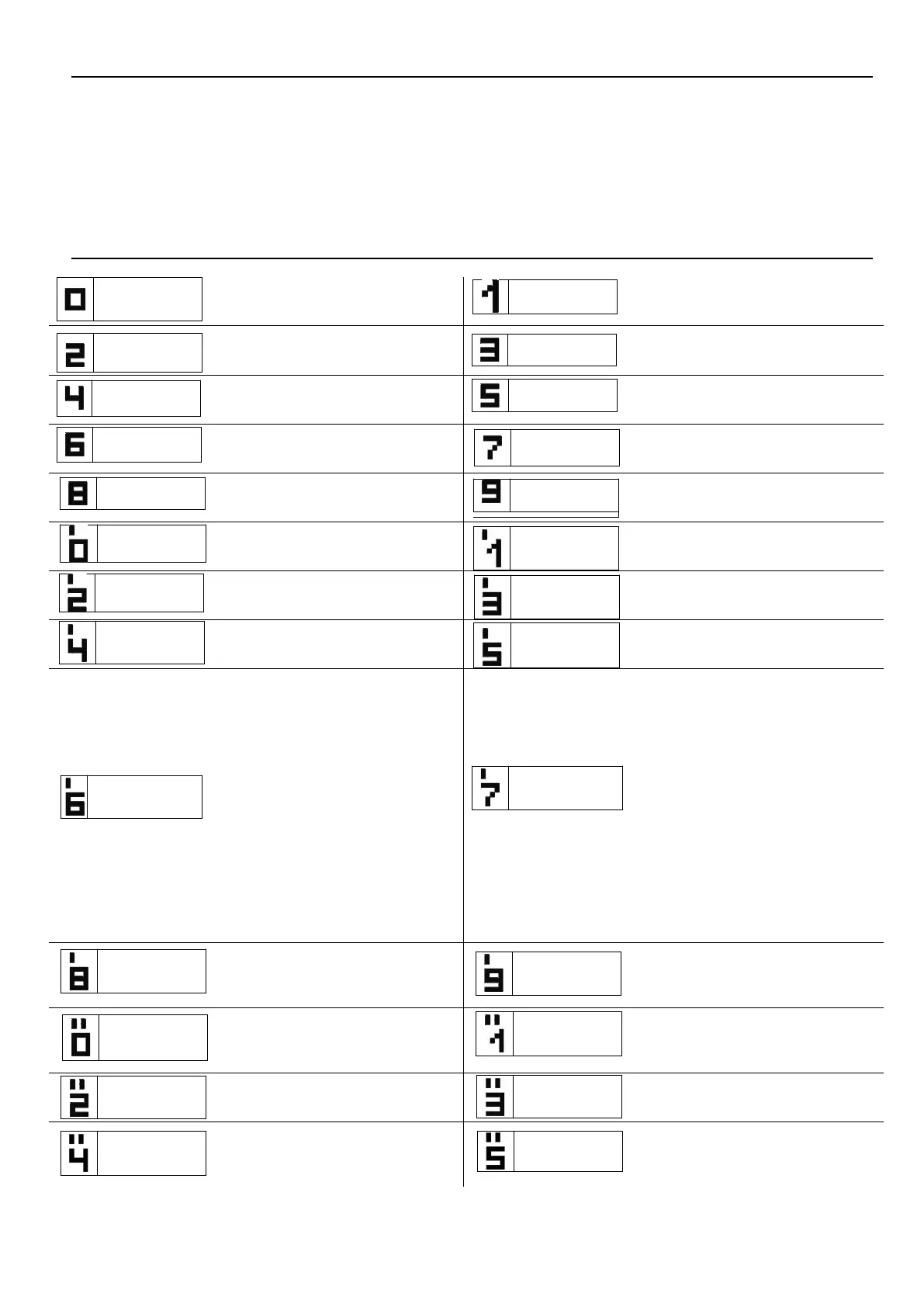
CDNP Panel programs:
SERVICE OPENING OF THE
ELECTRICAL DOOR STRIKE
CHANGE IN THE INDIVIDUAL
OPENING CODE OF THE
ADMINISTRATOR
SETTING QUIET OR LOUD CALL
SETTING THE NUMBER OF CALL
RINGS, PERMISSION TO CALL
THE PREMISES
SWITCHING ON –OFF THE BELL-
TINKLING TO A PEMISES AFTER
OPENING THE DOOR
SERVICE CALL OF THE
UNIPHONE FROM THE PREMISES
SETTING THE TIME FOR
CONTROL OF THE ELECTRICAL
DOOR STRIKE
CHANGING THE FITTER’S
PASSWORD
CHECKING THE CORRECTNESS
OF ASSIGNMENT OF THE CARD
TO THE PREMISES
CALL RANGE PARAMETERS
SETTING THE SELECTION OF
NUMBERS IN THE HOTEL
SYSTEM
ENTERING THE NEW TABLE OF
OPENING CODES
SELECTION OF THE ADDITIONAL
INPUT FUNCTION
SETTING ONE
OF FOUR CALL SIGNALS
SEARCH FOR IMPROPERLY
HUNG UP OR DAMAGED
UNIPHONES
THE ADDITIONALLY SERVICED
NUMBERS
Bits1
SETTING THE PANEL
PARAMETERS
Bit1 - Activating opening after corridor
opening time-out
Bit2 - Input function in the slave panel
Bit3 - Activation an optional additional
electronic module
Bit4 - Activating corridor opening
impulse
Bit5 - Activating number dialling in the
hotel system
Bit6 - Changing the direction of calling
number diversion (from the P9
programme)
Bit7 - Activating code change function
for the user
Bit8 - Blocking factory reset function
Bits2
SETTING THE PANEL
PARAMETERS
Bit1 - Choosing the preview camera in
standby mode
Bit2 - Short (four digit) administrator's
opening code
Bit3 - Porter calling
Bit3 - Porter redirection
Bit5 - Only calling for additional
numbers
Bit6 - Disable premise number display in
230E module
(from software v4.1)
Bit7 - Activating reverse eletric door
strike
Bit8 – compatible with multi master
module
THE PARAMETERS OF AN
ADDITIONAL INPUT/OUTPUT
MODULE
PROGRAMMING THE 230E
ELECTRONIC MODULE FOR
NAMES Beginning from the version
7.00 programming only via computer
PROGRAMMING THE ACC
PROXIMITY MODULE
PROGRAMING THE NAME
MODULE
2,6,10NP WITH BUTTONS
PROGRAMMING INTRO ON THE
DISPLAY
PROGRAMMING THE TIME FOR
SWITCHING ON THE PHRASE
„CALL SERVICE”
PROGRAMMING THE
ADDITIONAL „FROM-TO” RANGE
LINE TEST – CHECKING
THE HEADSETS IN THESYSTEM
ATTENTION! Full control panel configuration is possible by means of computer software ("CDNP") for free download
from www.aco.com.pl. An optional CDN-USB cable is required to connect the control panel to a computer. You can
also download the extended CDNP operating instructions along with a description of common problems from the site.
IU0404enVE.1938



 To Previous Page
 Loading...

