Chapter3 Installation / 15
CPU Installation
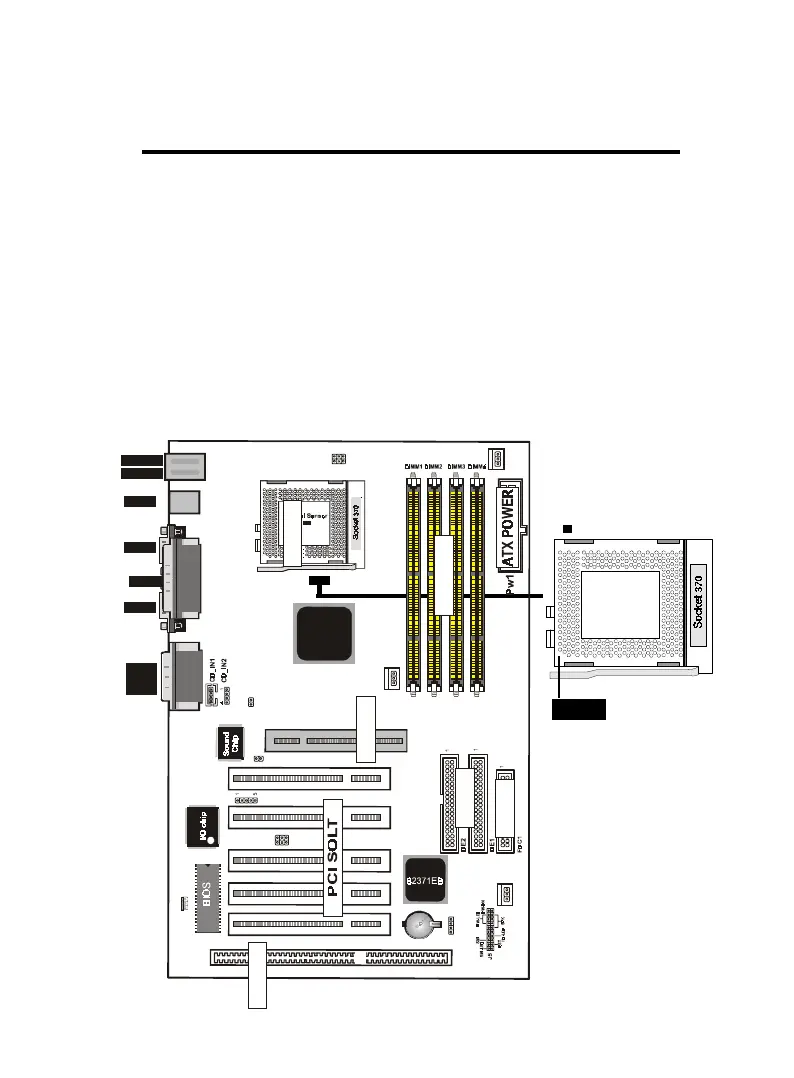
The motherboard provides a ZIF socket 370. The CPU that came
with the motherboard should have a fan attached to it to prevent
overheating . If this is not the case then purchase a fan before you
turn on your system.
To install a CPU , first turn off your system and remove its cover.
Locate the ZIF socket and open it by first pulling the lever sideways
away from the socket then upwards to a 90-degree right angle. In-
sert the CPU with the correct orientation shown . The notched cor-
ner should point towards the end of the lever. Because the CPU has
a corner pin for two of the four corners, the CPU will only fit in the
orientation as shown.
Notch
ISA SLOT1
FAN1
down :
up
K/B
:Mouse
USB
COM1
COM2
Printer
MIDI/
GAME/
AUDIO
FAN2
FAN 3
JP1
IDE
FDC
SOCKET
J3
LAN
82443BX
JP5
1
IR
J2
12
PCI1PCI2PCI3PCI5 PCI4
ISA SOLT
AGP1
AGP SOLT
J6
1
JP7
1
1
JP6
DIMM


 To Next Page