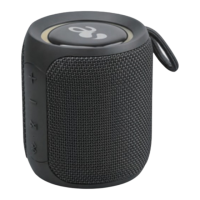
This document is an instruction manual for the Acoustic Solutions Q18S Bluetooth Speaker, model number 8994754. It provides detailed information on the speaker's features, operation, specifications, and maintenance.
Function Description
The Acoustic Solutions Q18S is a portable Bluetooth speaker designed for wireless audio playback and hands-free calling. It supports True Wireless Stereo (TWS) functionality, allowing two compatible speakers (Q28S, Q08S, or Q18) to be paired together for a combined stereo sound experience. The speaker also features an AUX IN port for wired audio connections and can function as a power bank to charge other devices. It includes multiple light themes for visual ambiance.
Important Technical Specifications
- Unit Dimensions (Approx.): W88 x D88 x H220 mm
- Unit Weight (Approx.): 700g
- Bluetooth Specification: V5.0
- Supported Bluetooth Profiles: A2DPV1.2, AVRCPV1.4, HFPV1.5, HSP1.2, GAVDP1.2
- Bluetooth Connection Distance: Max. 10m
- Bluetooth Operating Frequency: 2.402-2.480GHz
- Bluetooth Pairing Name: Acoustic Solutions Q28S (Note: Manual refers to Q18S on cover, Q28S in pairing name and TWS function, and Q08S/Q18 as compatible TWS speakers. This discrepancy might indicate a series or compatible models.)
- Built-in Battery: 2 x Li-ion 3.7V 2500mAh (Total 5000mAH)
- Playing Time: 12 hours (at 50% of volume setting)
- Power Source Input: USB Type C socket, DC 5V +/-0.5/2A (using a commercially available USB AC adapter not included)
- Signal-to-noise Ratio: 75db
- Frequency Response: 80Hz-20KHz
- Power Bank Output: DC5V 1A
- Audio In: 3.5mm AUX IN socket
- Output Power: 30W (RMS)
- Water Resistance Level: IP67 (Waterproof IPX7 – immersion 1m for 30 minutes; Dust ingress protection IP6X – against solid foreign objects)
- Operating Temperature: 0 to 45°C
Usage Features
The speaker offers a range of user-friendly features:
- Power On/Off: Press and hold the power button (1) for 2 seconds. The working state LED will flash (on) or turn off (off).
- Charging: Connect the speaker to a DC 5V charger using the supplied Type-C USB cable. The orange power LED will indicate charging and turn off when fully charged (approx. 3 hours).
- Bluetooth Pairing:
- Power on the speaker; the working state LED will flash green.
- Enable Bluetooth on your device.
- Search for "Acoustic Solutions Q28S" and select it. Enter "0000" if a password is required.
- The speaker will beep upon successful pairing, and the working state LED will turn solid green.
- The speaker automatically powers off if no connection is established within 20 minutes.
- Bluetooth Music Playback:
- Play/Pause: Press the power button (1).
- Volume Up/Next Track: Click the '+' button (3) to increase volume; long press to skip to the next song.
- Volume Down/Previous Track: Click the '-' button (4) to decrease volume; long press to skip to the previous song.
- Bluetooth Phone Calls:
- Answer/End Call: Click the Bluetooth/Reset button (7).
- Reject Call: Press and hold the Bluetooth/Reset button (7) for 2 seconds.
- AUX IN Mode:
- Connect an audio source to the speaker's AUX IN jack (8) using the 3.5mm audio cable.
- Play music from the audio source device.
- Press the power button (1) to play or mute the speaker.
- TWS Function (True Wireless Stereo):
- Ensure Bluetooth is off on your phone/device and no speakers are connected (remove AUX-in cable).
- Choose one speaker as the master unit and click its TWS button (5). The two speakers will automatically connect.
- Turn on Bluetooth on your device, search for "Acoustic Solutions Q28S", and connect.
- For wired audio via Aux Cable, connect to the master unit.
- Once connected, TWS will re-connect automatically on subsequent power-ons. To clear TWS pairing, long press the TWS button (5).
- Light Theme: Double-click the TWS button (5) while playing music to cycle through three light themes: Gradient changing light, Breathing light, and No light.
- Reset: Press and hold the Bluetooth/Reset button (7) for 2 seconds to clear pairing records.
- Power Bank Output: The speaker has a power bank output port (9) to charge other devices (DC5V 1A).
Maintenance Features
- Cleaning: Use a clean, soft cloth and a mild detergent solution to clean the surface of the unit. Do not use abrasives, benzene, thinner, or other solvents.
- Storage: Avoid exposing the unit to direct sunlight, very high or low temperatures, moisture, vibrations, or dusty environments. Do not place it in enclosed bookcases or racks without proper ventilation.
- Safety Precautions:
- Do not place naked flame sources (e.g., lighted candles) on the speaker.
- Do not expose to dripping or splashed fluids; keep objects filled with liquids away.
- Never attempt to insert wires, pins, or other objects into vents or openings.
- Do not disassemble or modify the speaker (no user-serviceable parts except for a stylus, if applicable, though not mentioned for this model).
- If damaged or malfunctioning, consult a qualified service engineer.
- Batteries should not be exposed to excessive heat or direct sunlight.
- Always charge with a clean, dry USB Type-C connector to prevent excessive heat or melting.
- Disposal:
- Do not dispose of the product with household waste.
- Hand it over to a collection center for recycling electrical and electronic appliances.
- Dispose of batteries separately at an appropriate recycling point/center.
- Consult your Local Authority or recycling advice for detailed information.
- Troubleshooting: The manual includes a troubleshooting section for common issues like the speaker not switching on (recharge it) or difficulty pairing with Bluetooth devices (check A2DP profile, proximity, and clear existing pairings by pressing the Bluetooth/Reset button).
- Guarantee: The product is guaranteed for twelve months from the date of original purchase against faulty materials or workmanship. The guarantee does not cover accidental damage, misuse, cabinet parts, knobs, or consumables. It requires correct installation and operation, domestic use only, and is void if re-sold or damaged by inexpert repair. Specifications are subject to change without notice.

 Need help?
 General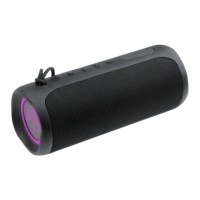

 To Next Page