EasyManua.ls Logo

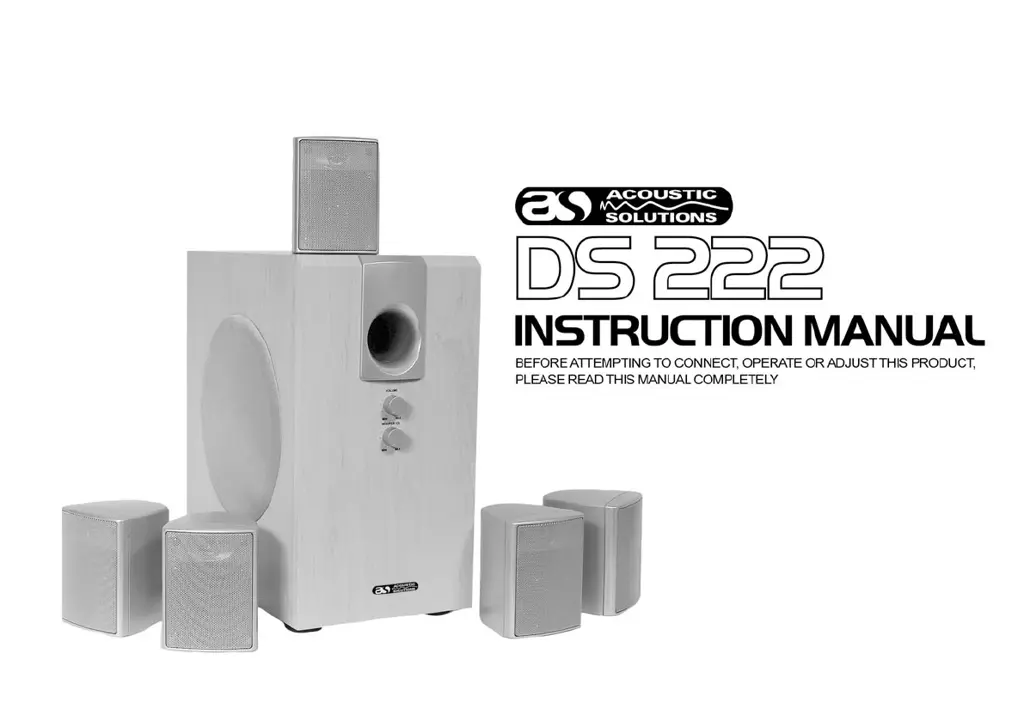
ACOUSTIC SOLUTIONS DS 222 - User Manual

ACOUSTIC SOLUTIONS DS 222
9 pages
Print Icon
To Next Page IconTo Next Page
Loading...
REV: 1/087/1.1

Questions and Answers

  • J
    Jay HollowayAug 12, 2025
    How to fix sound only coming from one channel on ACOUSTIC SOLUTIONS DS 222?
    • J
      jennifermaddoxAug 12, 2025
      If you're only getting sound from one channel on your ACOUSTIC SOLUTIONS Speakers, it could be due to an improperly connected amplifier input terminal. Ensure that the input terminal is connected correctly. Another possible cause is that the input level is too high. Adjust each volume channel correctly to balance the sound.
  • J
    Julie JohnsonAug 21, 2025
    What to do if my ACOUSTIC SOLUTIONS DS 222 Speakers have no sound?
    • A
      Anita JamesAug 21, 2025
      If you are experiencing no sound with your ACOUSTIC SOLUTIONS Speakers, there are several potential causes. First, ensure that the speaker terminal, sound frequency terminal, and AC plug are all properly connected. Make sure the AC plug is securely inserted into the outlet. If the connections are correct, check the volume level and increase it using the volume control dial. Finally, if the speaker terminal is short-circuited, turn off the power, reconnect the speakers, and then turn the power back on.
  • J
    judy62Aug 31, 2025
    Why do my ACOUSTIC SOLUTIONS DS 222 Speakers sound distorted?
    • L
      Lisa BrownAug 31, 2025
      Sound distortion in your ACOUSTIC SOLUTIONS Speakers can occur if the amplifier input terminal is improperly connected. Ensure that the input terminal is correctly connected. If the connection is correct, the volume might be set too high. Lower the volume using the volume control dial to reduce distortion.

ACOUSTIC SOLUTIONS DS 222 Specifications

General IconGeneral
BrandACOUSTIC SOLUTIONS
ModelDS 222
CategorySpeakers
LanguageEnglish

Related product manuals