61
05/2019
60
40019308
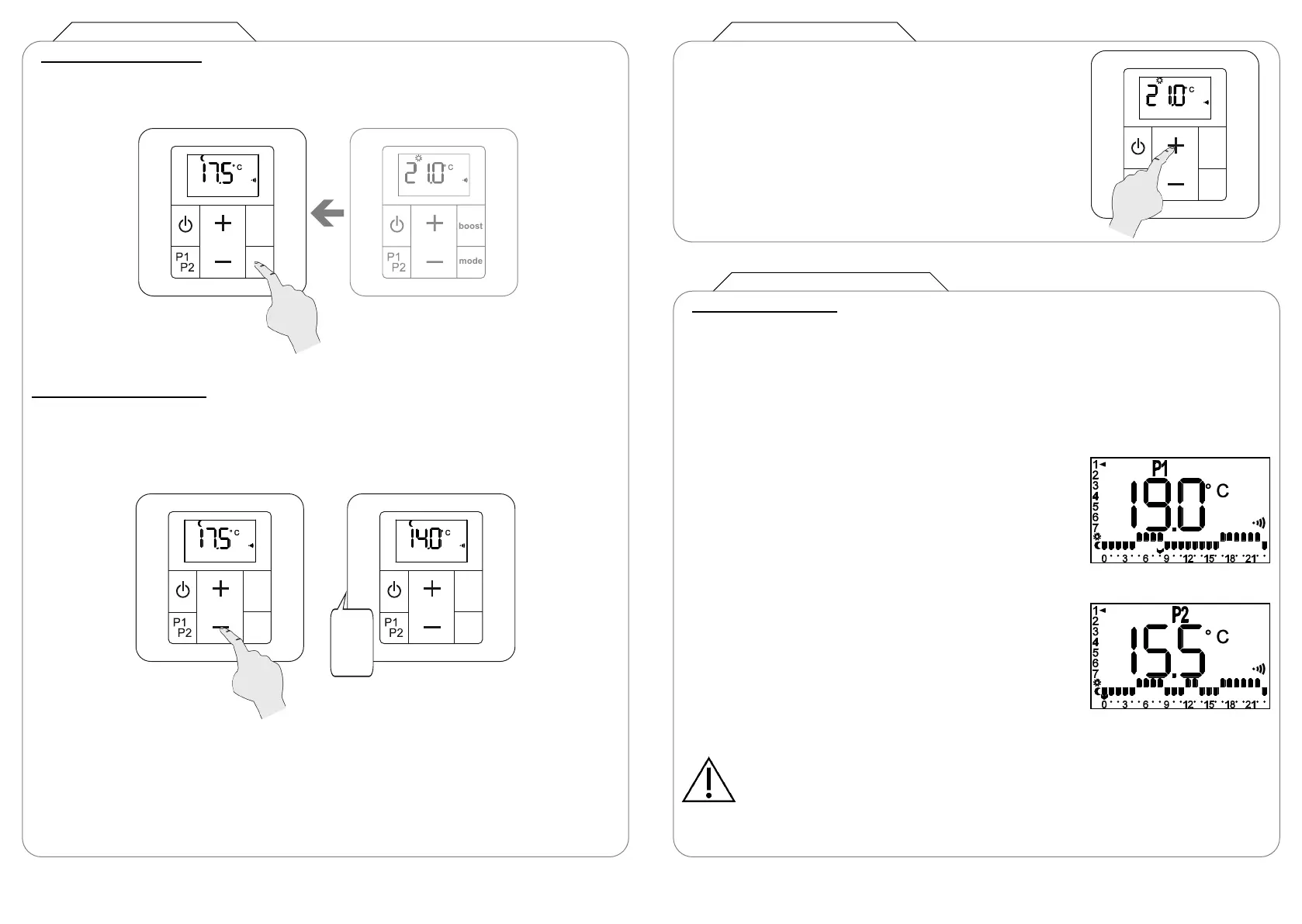
PROGRAMMES P1 AND P2
COMFORT MODE
(recommended if the room is occupied)
The setpoint temperature can be adjusted from 7 to 28°C in
0.5°C steps.
The LED on your receiver unit is on, showing red.
(Pre-set programmes)
Your appliance’s remote control includes two daily programmes, P1 and P2. These are based on
various room usage scenarios (your appliance changes from Comfort mode to Eco mode,
depending on the time).
The LED on your receiver unit will light up with the colour corresponding to the current operating
mode (see chapter 4.2).
P1 is to heat your room between 5 and 9am, then from 5 to
11pm (e.g. working day).
P2 is to heat your room between 5 and 9am, from 12 to 2pm
and then from 5 to 11pm (e.g. working day, returning home at
midday).
NOTE:
You can also customise the operation of these programmes P1 and P2 yourself (see
chapter 7).
Default content for
programme P1
Default content for
programme P2
ECO MODE (continued)
A) Linked Eco operation
The linked eco (economy) mode allows the temperature to be reduced by 3.5°C compared to the
desired temperature level for the Comfort setting.
The user cannot change this temperature set-
ting. It cannot be higher than 19°C or lower
than 7°C.
B) Unlinked Eco operation
You can choose to unlink the Eco mode temperature from that of the Comfort mode (see
chapter 5.3 parameter 2). You can then choose the room temperature when the appliance is
running in Eco mode.
Your chosen unlinked eco temperature must have at least 1° of difference from the temperature
set for Comfort mode (e.g.: your Eco temperature cannot be higher than 18°C if your Comfort
temperature is set at 19°C).
If you don’t enter a setting, the unlinked Eco temperature will have a default value of 15.5°C.



 To Next Page