Need help?
Do you have a question about the Acson OM-G12-0104 and is the answer not in the manual?
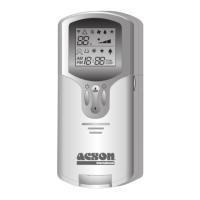
This document describes the Acson International G12-0104 remote controller, a device designed for operating air conditioning units. It provides detailed instructions on its functions, usage, and basic maintenance.
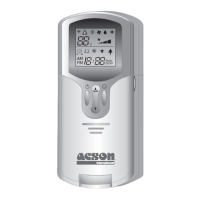
The Acson G12-0104 remote controller serves as the primary interface for managing an air conditioning unit. It allows users to control various aspects of the air conditioner's operation, including power, temperature, operating mode, fan speed, turbo function, timer settings, automatic air swing, sleep mode, clock settings, personalization, and ionizer function. The remote transmits signals to the air conditioner, and a visual indicator confirms successful transmission.
The remote controller operates by transmitting signals to the air conditioning unit. The temperature setting range is from 16°C to 30°C (or 61°F to 86°F), allowing for precise climate control. The timer function allows for setting the air conditioner to turn on or off at specific times, with a maximum setting of 7:30 AM for turning on and 7:30 PM for turning off. The sleep mode automatically adjusts the temperature by 1°C every half hour for the first two hours, and then by 2°C for the following hour, to prevent excessive cooling during summer or excessive heating during winter. The device requires batteries for operation, which are inserted into a compartment at the back of the unit.
1. Transmission Source: The remote controller sends signals to the air conditioner. 2. Signal Transmission Indication: A blinking pattern on the display confirms that the last setting has been successfully transmitted to the unit. 3. "ON/OFF" Button: * Press once to start the air conditioner unit. * Press again to stop the unit. 4. Temperature Setting: * Use the ▲ or ▼ buttons to increase or decrease the set temperature. * The temperature setting range is 16°C to 30°C (Optional setting 20°C to 30°C). * Press both buttons simultaneously to toggle between °C and °F settings. 5. Operation Mode: * Press the MODE button to select the type of operating mode. * For cooling only units, the available modes are: COOL (❄), DRY (?) and FAN (☴). * For heat pump units, the available modes are: AUTO (Ⓐ), COOL (❄), DRY (?), FAN (☴) and HEAT (☀). 6. Fan Speed Selection: * Press the FAN button continuously to toggle the fan speed in the following order: Low ➞ Med ➞ High ➞ Auto. * Stop pressing when the desired fan speed appears on the display screen. 7. Turbo Function: * Press ❄ for fast cooling or heating operation. * The temperature will be increased internally if it is in HEAT mode, and decreased if in COOL or DRY mode. * Fan speed will be increased if it is not at maximum speed. * The temperature and fan speed will resume to user setting if ❄ is pressed again or after 20 minutes. * Available under HEAT, COOL, and DRY modes only. 8. ON Timer Setting: * Press the SET button to activate the ON timer function. * Set the desired on time by pressing the SET button continuously. If the timer is set to 7:30 AM, the air conditioner will turn on at 7:30 AM sharp. * Press the CLR button to cancel the ON timer setting. 9. OFF Timer Setting: * Press the SET button to activate the OFF timer function. * Set the desired off time by pressing the SET button continuously. * Press the CLR button to cancel the OFF timer setting. 10. Automatic Air Swing (Optional): * Press the SWING button to activate the automatic air swing function. * To distribute the air in a specific direction, press the SWING button and wait until the louvers move to the desired direction, then press the button once again. 11. Sleep Mode Setting: * Press the SLEEP button to activate the sleep mode function. * This is an energy-saving option. When the unit is operating under cooling mode, the set temperature is increased by 0.5°C after the first half hour, 1°C after the second half an hour, and a total of 2°C after the following 1 hour. This function will prevent excessive cooling during summer season. * When the unit is operating under heating mode, the set temperature is decreased by 1°C after the first half an hour, 2°C after the second half an hour, and a total of 3°C after the following 1 hour. This function will prevent night sweat during summer season. * This function is available under COOL, HEAT and AUTO mode. 12. Clock Time Setting: * Press ▲ button to increase the clock time. * Press ▼ button to decrease the clock time. 13. Personalize Setting: * Press ☋ and hold for 3 seconds, then ☋ will blink. Press again to cycle between ☋ and ☌. * Set the desired setting, then press the button for 4 seconds without pressing any key and it will save the setting into the programme. * Press ☋ once to activate the P1 setting, press again to cycle between P1 and P2. * Press any key to deactivate the personalize setting. 14. Ionizer Setting (Optional): * Press ☋ will activate the ionizer function. * Press again to deactivate the function.
The manual primarily focuses on the operational aspects of the remote controller and does not detail extensive maintenance features. However, it does include instructions for inserting and replacing batteries, which is a fundamental maintenance task for any battery-operated device. Users are instructed to open the battery compartment at the back of the remote and insert new batteries, ensuring correct polarity. Regular battery replacement is essential for the continuous and proper functioning of the remote controller. No other specific maintenance procedures are outlined in the provided document.
 General
| Brand | Acson |
|---|---|
| Model | OM-G12-0104 |
| Category | Air Conditioner |
| Language | English |

 To Next Page