Hardware Manual
25
Typical Connection
Based on these specifications, if the DI device has a voltage of 0V ~ 30V or the DO device has
a voltage of < 24V (< 50mA), then the camera can supply internal power to these devices and
there is no need to connect the DI/DO device to an external power source.
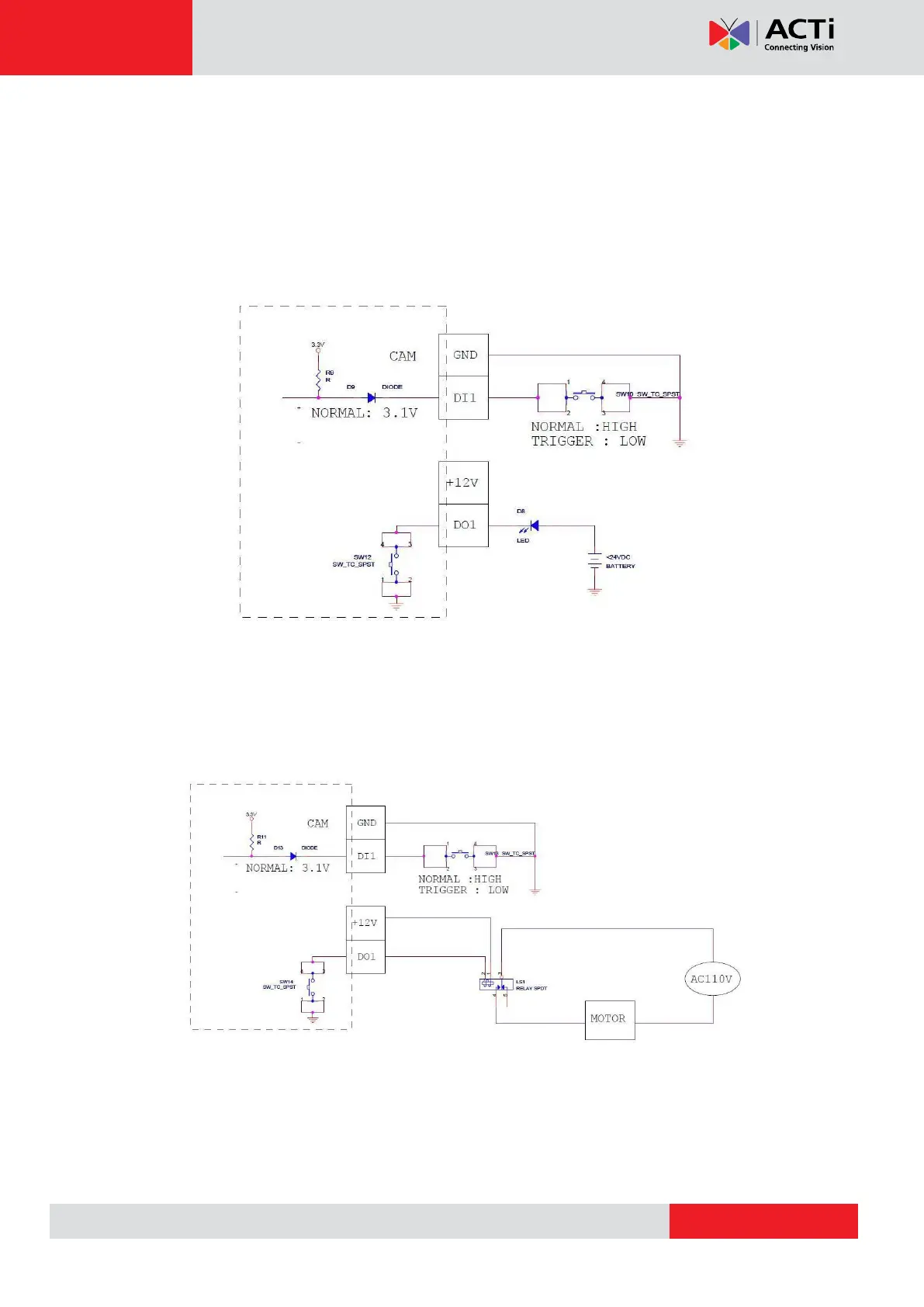
In this case, wire connection to Pins 1 to 4. Use the DIO GND and DI pins to connect a DI
device and use the DIO PW and DO pins to connect a DO device. See wiring scheme below:
High Voltage DO Device Connection
Even though the camera provides 12V power, this may not be enough for some high voltage
DO devices, such as a ceiling light or a motor that opens or closes a gate. In this case, there is
a need to connect an external relay. See wiring scheme below:
Note that when choosing an appropriate relay, please refer to its specifications and make sure
they match the above design. The triggering circuit voltage has to be around 12V DC and the
switch-controlled circuit voltage has to match the external power supply (e.g. 110V AC or 220V
AC).


 To Next Page