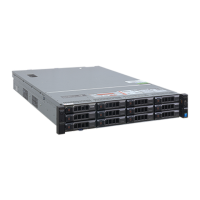
This document is a Quick Installation Guide for the ACTi GNR-410, a 64-Channel 8-Bay Rackmount Standalone NVR (Network Video Recorder). It provides essential information for setting up the NVR system via its local interface, covering hardware installation, initial software configuration, and basic usage.
Function Description:
The ACTi GNR-410 is a standalone Network Video Recorder designed for surveillance systems. Its primary function is to record, store, and manage video streams from up to 64 network cameras. As a standalone unit, it operates independently without requiring a separate server or PC for core recording and management tasks. It supports local interface access for quick setup and configuration, and can also be accessed as a web client for more detailed operation and management. The NVR is designed to be rack-mounted, occupying 2U of vertical space in a standard server rack. It features 8 bays for 3.5-inch SATA hard disks, allowing for significant storage capacity for recorded video. The system runs on a Windows operating system, enabling users to leverage familiar interface elements for configuration and management.
Important Technical Specifications:
- Model: GNR-410
- Channel Capacity: 64-Channel
- Drive Bays: 8-Bay, supporting 3.5-inch SATA hard disks.
- Form Factor: Rackmount, 2U vertical space.
- Connectivity:
- USB Ports: 2 on the front panel, 4 on the rear panel.
- Video Output: VGA Port, Display Port / HDMI Port.
- Network Ports: LAN1 Port, LAN2 Port.
- Audio: Audio Line In, Audio Out, Audio Mic In.
- Other Ports: Serial Port, eSATA Port.
- Power: AC Power Connector, Power Switch.
- Storage: Requires ACTi-certified 3.5-inch SATA hard disks. The guide references
http://www.acti.com/hddselector for certified models.
- Operating System: Windows-based, with a default administrator password "123456".
- Network Configuration: Supports DHCP for automatic IP address assignment, with options for static IP configuration via Windows Network and Sharing Center.
- Video Recording: Supports continuous (Schedule Recording) and event-triggered (Event Recording) recording modes.
Usage Features:
- Quick Installation: The guide emphasizes a streamlined setup process via the local interface.
- Hardware Installation:
- Rackmount: Designed for standard server racks, requiring 5 cm clearance for airflow. A GNR Sliding Rail Kit is available for mounting.
- Hard Disk Installation: Step-by-step instructions for removing disk trays, mounting 3.5-inch SATA hard disks, and inserting trays back into the chassis.
- Device Connection: Illustrates connecting network cameras, network cables, a network switch, a monitor (VGA or HDMI), a USB/PS/2 mouse, and eSATA storage.
- Front Cover Attachment: Instructions for securing the front cover after configuration.
- Start-Up Procedure: Details the sequence for powering on the unit using the rear power switch and front power button, and logging into Windows with the default password.
- Software Configuration:
- Disk Volume Creation: Guides users through using Windows Disk Management to initialize hard disks (recommending GPT partition style for disks larger than 2TB) and create new volumes (Simple, Spanned, Striped, Mirrored, or RAID-5).
- Storage Drive Selection: Instructions for selecting storage drives within the NVR software, allowing users to specify which drives are used for recording and to reserve space.
- Camera Addition:
- Search Cameras: Automatic discovery of ACTi and ONVIF-compliant cameras on the local network.
- Add Camera Manually: Manual configuration for cameras in different networks, requiring Media Type, IP Address, HTTP Port, Protocol, Account, and Password.
- Camera Settings Configuration: Accessing Basic, Video, PTZ, or Preset Tour settings for connected cameras.
- Recording Schedule: Configuring recording modes (Schedule Recording for continuous, Event Recording for triggered) and defining time sessions on a weekly timetable.
- User Management: Creating user groups and individual user accounts with specific passwords and assigning them to groups. The default administrator password "123456" should be changed for security.
- Customizing Views:
- Live View Layouts: Creating new layouts, selecting layout styles, and adding camera or map views to channels.
- Saving Views: Saving customized views and setting a default view.
- Validation:
- Live Streaming Check: Verifying live video feeds from all channels via the Live View page.
- Recording Check: Reviewing recorded video on the Playback page by selecting a view or camera and navigating the time bar.
Maintenance Features:
- Hard Disk Management: The ability to create various disk volumes (Simple, Spanned, Striped, Mirrored, RAID-5) suggests robust storage management options, potentially aiding in data redundancy and performance. The guide recommends using disks of the same model and capacity for Striped, Mirrored, or RAID-5 volumes.
- System Log: The NVR software includes a setting to "Keep System Log (days)," indicating that system events and activities are logged, which can be useful for troubleshooting and auditing.
- Firmware/Software Updates: The document mentions "continuous product improvements" and advises users to download the latest user documentation from
http://www.acti.com/downloadcenter, implying that software and firmware updates are available to enhance functionality and address issues.
- Product Manuals: For detailed instructions on installation, operation, and web client login, users are directed to product manuals on the ACTi corporate website, providing comprehensive resources for ongoing maintenance and advanced configuration.
- Security: The guide explicitly advises changing the default administrator password "123456" for security reasons, highlighting a key security maintenance practice.

 Need help?
 General

 To Next Page