Standalone NVR Quick Installation Guide 9
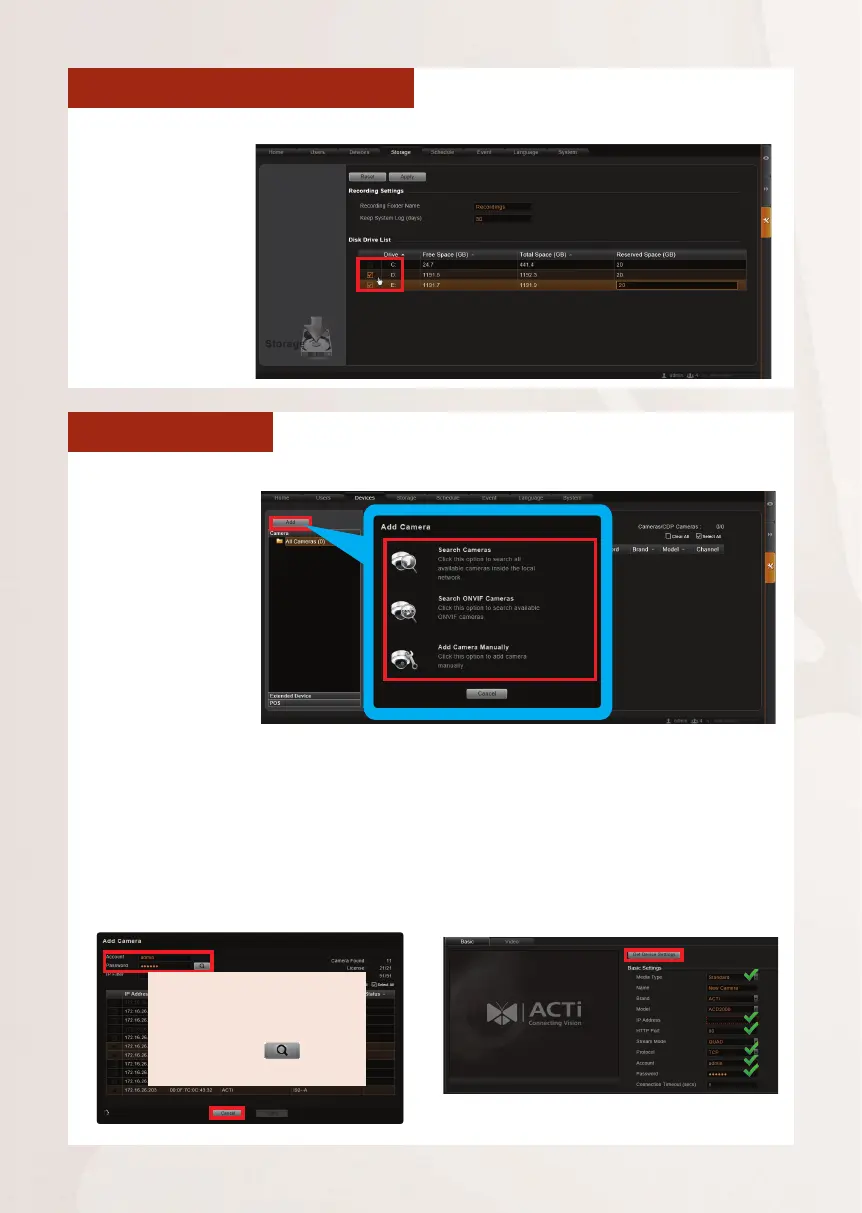
SELECT STORAGE DRIVES
1. Go to Setup page and then Storage tab.
ADD CAMERAS
1. Go to Setup page and then Devices tab.
Search Cameras
Use “Search Cameras” to auto-
search the network for ACTi cameras,
or “Search ONVIF Cameras” for
ONVIF-compliant cameras of any brand.
After selecting your desired cameras,
click “Apply”.
Add Camera Manually
If you are adding a camera located in
another network, use “Add Camera
Manually”. Fill in Media Type, IP
Address, HTTP Port, Protocol, Account
and Password. Finally, click “Get Device
Settings” and then “Apply”.
To nd ONVIF-compliant
cameras, input the correct
account and passowrd rst,
and then click to start
searching.
2. Click “Add”.
3. Choose a search
method based
on your network
environment
and the brand of
the camera.
2. On Disk Drive
List, de-select C
Drive, and select
other storage
drives.
3. Click “Apply“.



 To Next Page