Standalone NVR Quick Installation Guide 5
START-UP
CREATE HARDWARE RAID
1. On the unit’s front panel, press down Power Button to turn on the unit.
2. As this unit starts up, you will enter Windows logon screen. Input the
password“123456“tologinasadministrator.
Note
Before removing or in-
serting the hard disk
trays, please make sure
the unit is turned off.
Moving the trays while
the unit is operating
can cause damage to
the disk.
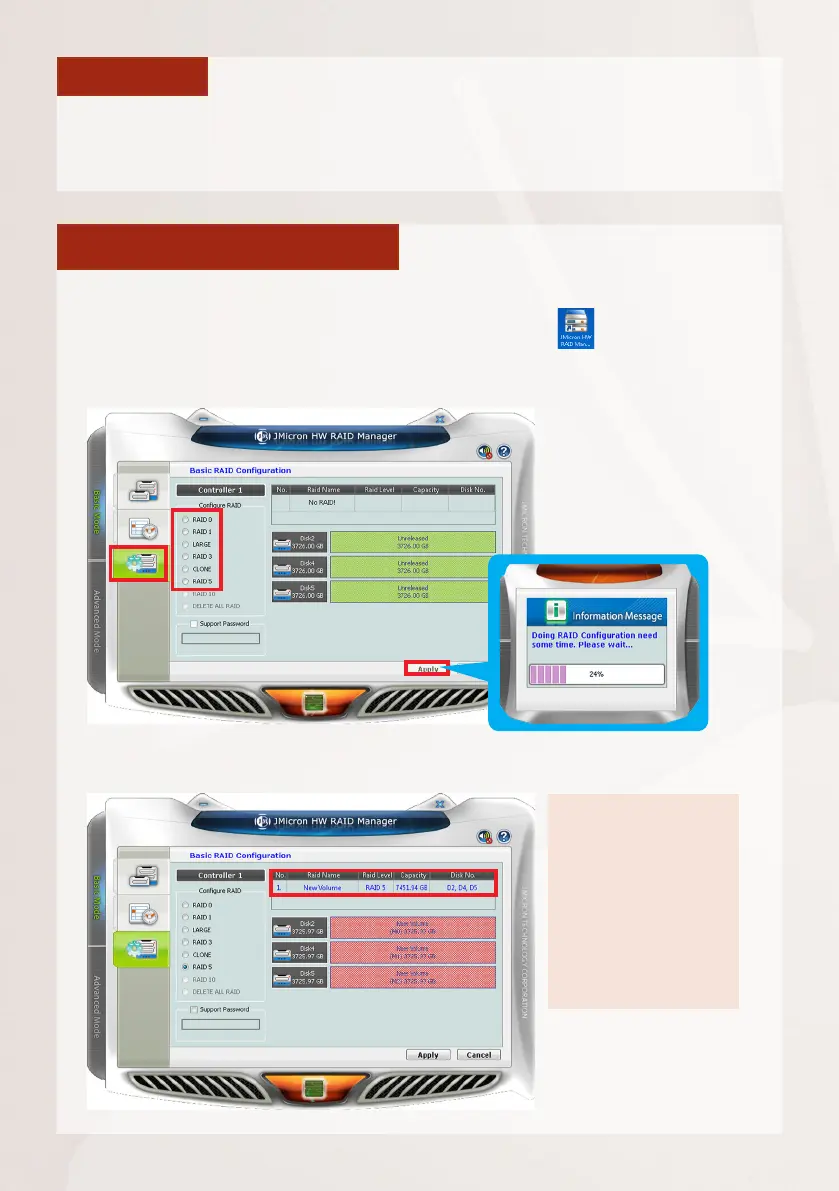
AsthisunitsupportshardwareRAIDconguration,youcanmakediskarraysusing
the bundled software utility.
1. On Windows Desktop, double-click on the shortcut to initialize the
RAID management utility.
2. On Basic RAID Conguration tab, select a RAID type and click on “Apply“.
3.Afterthecongurationiscomplete,theRAIDinformationwillappear.



 To Next Page