Encoder Hardware Manual
24
CAUTION: Incorrect wiring may cause damage to the connected devices.
DISCLAIMER: ACTi will not be responsible for any damage caused by improper wiring.
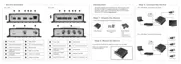
2. Connect a ground wire to the GND terminal pin to complete the connection.
For more information on connecting PT scanners, please refer to the Knowledge Base article:
Pan and Tilt Scanner for ACTi Zoom Encoders
(http://www.acti.com/support/KnowledgeBase/outside/detail.asp?KB_ID=KB20110120001)
available on the website.



 To Next Page