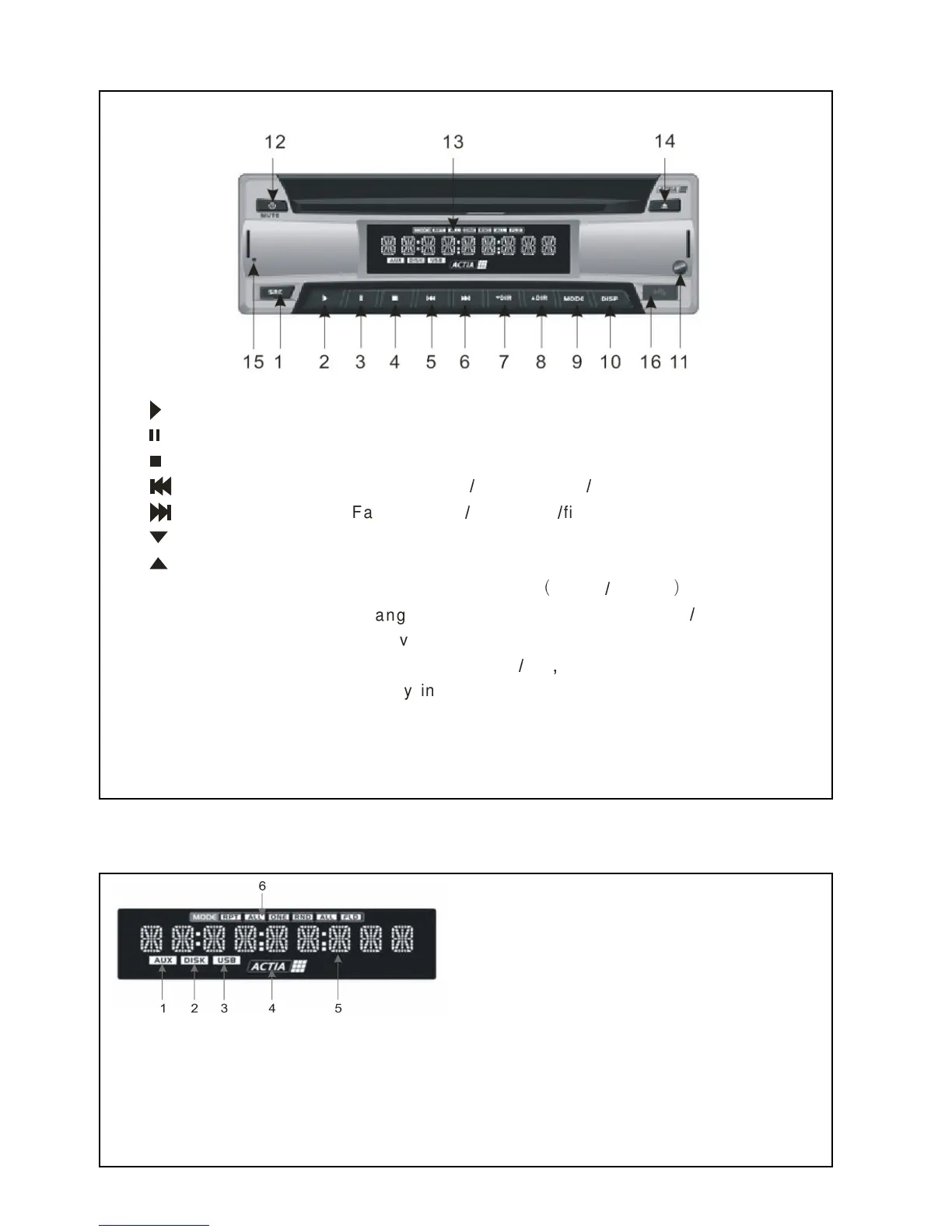
Locations of Parts (Main unit)
2
9 MODE
10 DISP
11 Re mo te Sen so r
12 POWER
13 L CD DISPLAY
14 EJECT
15 RESET
16 USB PORT
4
3
6
5
7 DIR
8 DIR
Pla y th e Me d ia
Pa u se th e reprod u ction
Sto p th e reproduction
F ast re a rwa rd Previe w tra c k file
+ +
F ast ad va n ce
Se le ct Lo wer direc to ry
Se le ct up pe r directory
Se le ct th e p lay MODE re p e a t rand o m
, -
+
Change the info that disp la yed o n L CD Monitor
+
Receive s a light sig n al from th e remote co n trolle r
Turns th e p o wer on o ff Mu te
+/.
Disp la y info a bo u t th e cu rrent state o f pla y e r and dis c
Disc a re eje cte d from th is button
Reset th e u n it by hard wa re
Insert th e USB an d p lay the file
+ +
Next tra ck file
1 AUX ICON Indicate the selection of AUX source
2 DISK ICON Indicate the selection of DISK source
3 USB ICON Indicate the selection of USB source
4 ACTIA LOGO Running the icon circularly when reading the disc
5 DIGITAL ICON Indicate information about operation


 To Next Page