12 13
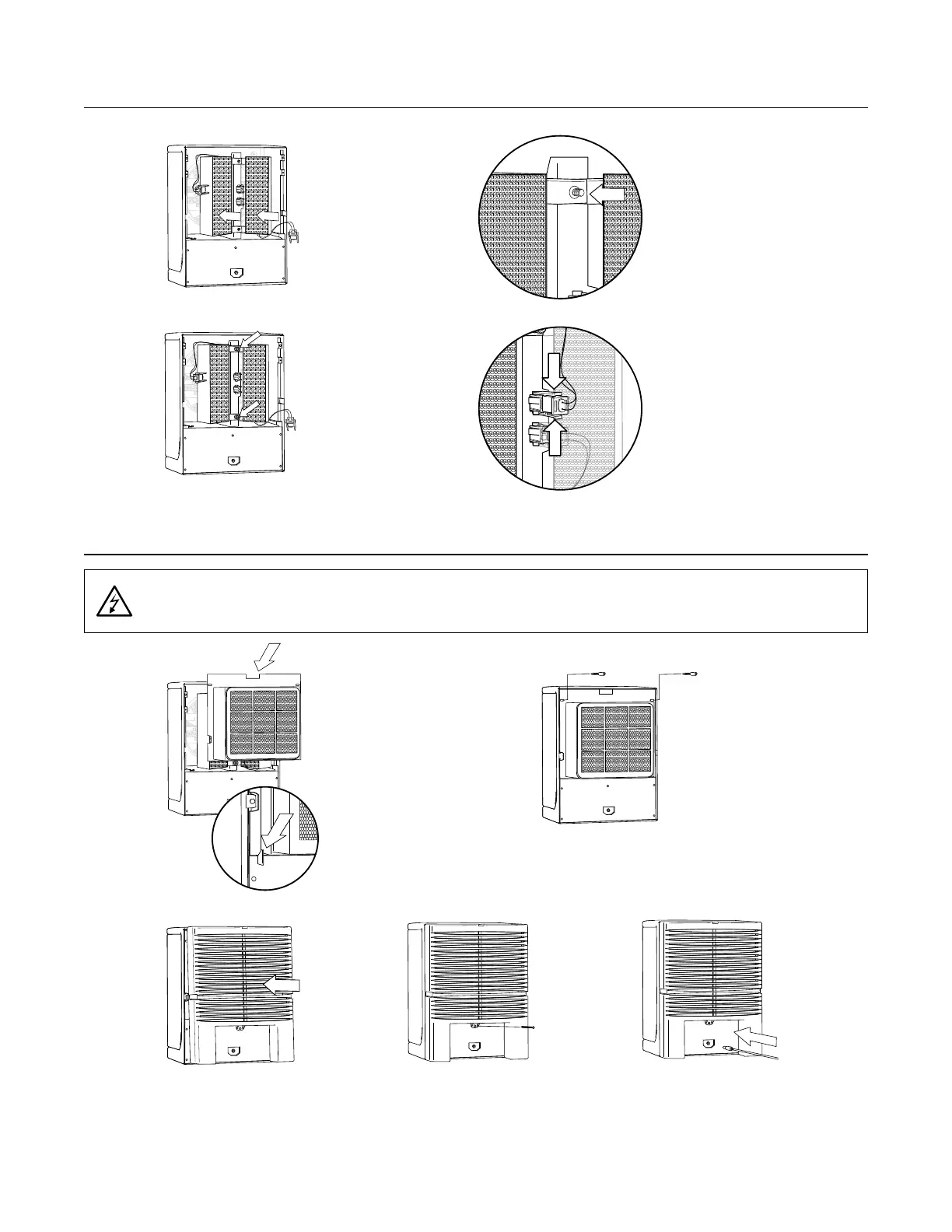
2. Replace the two (2)
thumbscrews and tighten.
1. Replace the ActivePure®
Cell(s) in the unit by aligning
the holes in the ActivePure®
Cell brackets and the studs on
the ActivePure® Cell hangers.
3. Insert the ActivePure® Cell
connector into the plug
on the ActivePure® Cell
bracket. Press connector
firmly until the two tabs
lock into place. Repeat for
Cell 2.
5. Reinstall the power cord.
2. Secure the top
of the Filter
Assembly by
replacing the
two (2) Filter
Assembly holder
thumbscrews.
1. Replace the Filter Assembly,
inserting the bottom of the Filter
Assembly first.
NOTE: The bottom of the Filter
Assembly is held into place
by two alignment guides
(see inset).
4. Replace the back cover screw.
3. Replace the back cover by
snapping into place, making
sure the tab is correctly inserted.
INSTALLING THE ACTIVEPURE® CELL
INSTALLING THE FILTER ASSEMBLY
WARNING: Do not operate the AP3000 II without the Filter Assembly and back cover
properly installed.


 To Next Page