11
Set-up Diagrams
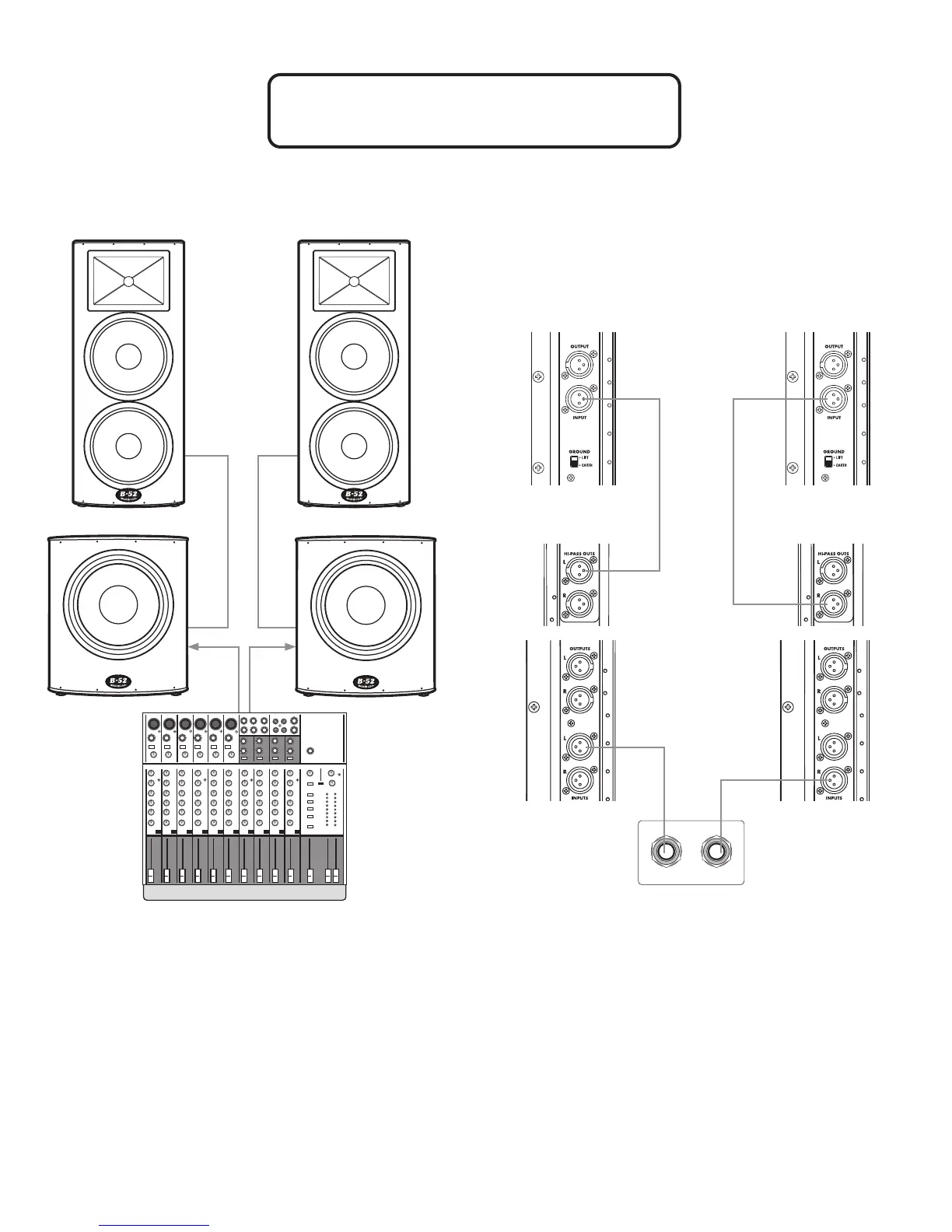
ACTPRO-1515 HD Main Speakers with Two ACTPRO-HD Subwoofers
MAIN OUTPUTS
1 2
Checklist
• Make certain loudspeakers are Powered OFF and Levels
turned down.
• Connect the Mixer’s Main Left Output to the Left Input of the
Left subwoofer.
• Connect the Mixer’s Main Right Output to the Right Input of the
Right subwoofer.
• Connect the Left ACTPRO-Subwoofer High Pass Output L to the
Input of the Left Main Speaker.
• Connect the Right ACTPRO-Subwoofer HD High-Pass Output R
to the Input of the Right Main Speaker.
• Set the Low Cut switch on the Main Speakers to OFF.
• Set Subwoofer BBE to ON.
• Set Main Speaker BBE to OFF.
• Power ON Mixer, then Power ON subwoofers, then
Main Speakers.
• Bring the Mixer’s volume up to normal operating level.
• Adjust the Level controls on the ACTPRO-HD series
loudspeakers.
• Do not adjust the Level so high that the Red LIMIT LED is
constantly lit.



 To Next Page