12
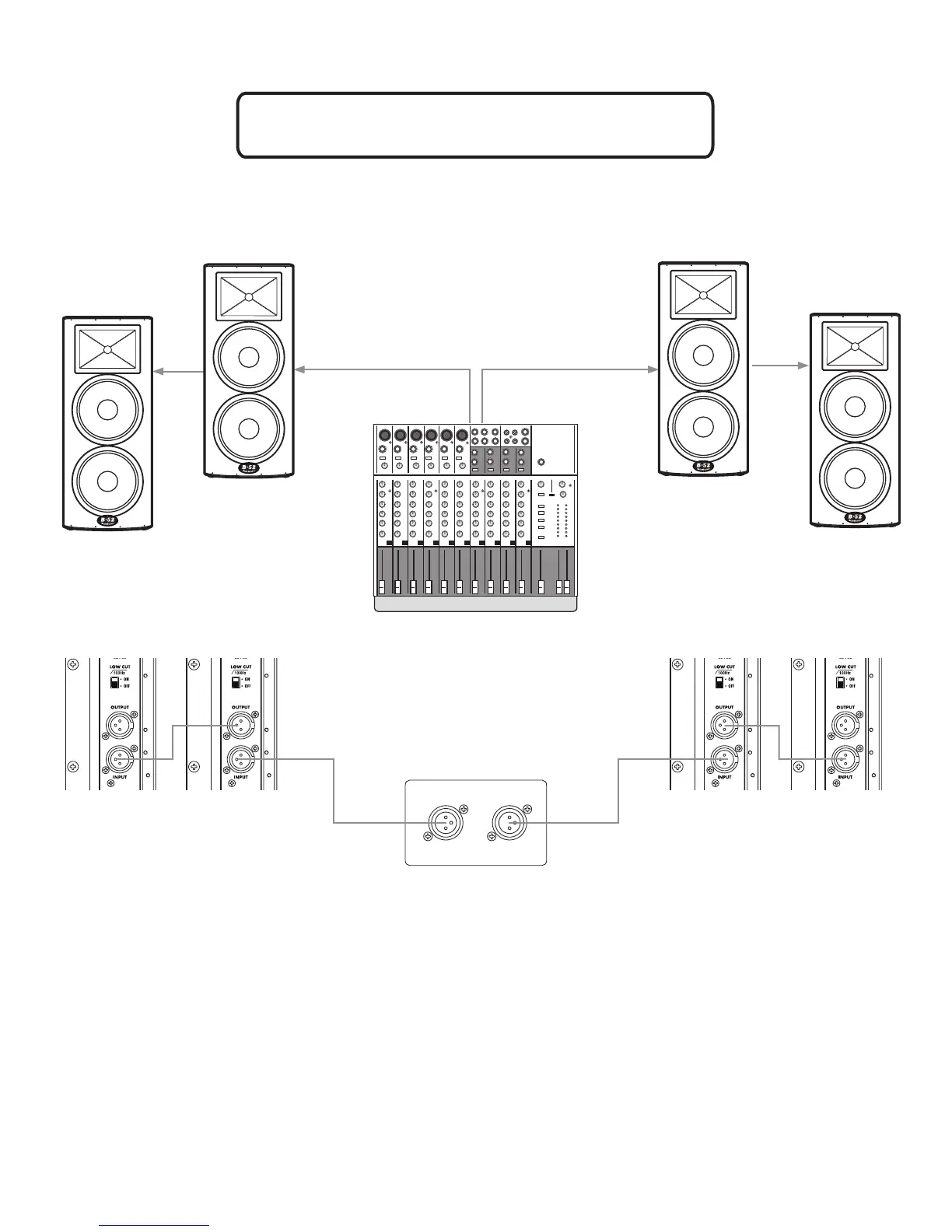
Linking Multiple ACTPRO-1515HD Speakers
MAIN OUTPUT
L R
Checklist
• Also known as Daisy-Chaining, linking multiple speakers will
send the exact same input signal from one speaker to the next.
• Make certain loudspeakers are Powered OFF and Levels
turned down.
• Connect the Mixer’s Main Left Output to the Input of Speaker 2.
• Connect the Output of Speaker 2 to the input of Speaker 1.
• Connect the Mixer’s Main Right Output to the Input of Speaker 3.
• Connect the Output of Speaker 3 to the input of Speaker 4.
• Turn down the Mixer’s volume.
• Set Main Speaker BBE to ON if desired
• Power ON Mixer, then Power ON speakers.
• Bring the Mixer’s volume up to normal operating level.
• Adjust the Level controls on the loudspeakers. Do not adjust the
Level so high that the Red LIMIT LED is constantly lit.
1
2
3
4



 To Next Page