Need help?
Do you have a question about the Actron CP9125 and is the answer not in the manual?
Explains DANGER, WARNING, CAUTION, and IMPORTANT signal words used in the manual.
Explains how to read diagnostic trouble codes from the vehicle's computer modules.
Describes how to interpret the Malfunction Indicator Lamp (MIL) status on the vehicle.
Explains how to view the status of vehicle emission system monitors.
Details the format and components of diagnostic trouble codes (DTCs).
Guidelines for proper disposal of the electronic device according to regulations.
Compliance information regarding electromagnetic interference for the device.
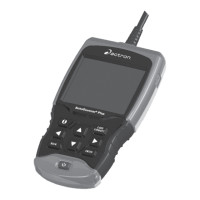
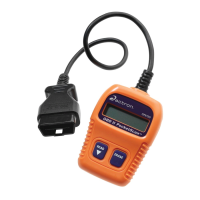
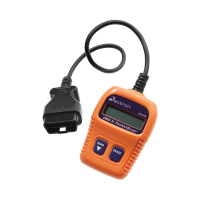
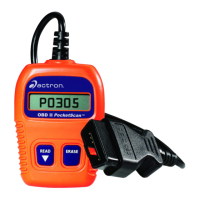
The Actron CP9125 OBDII PocketScan® Code Reader is a diagnostic tool designed to help users identify and understand problems with their vehicles by reading Diagnostic Trouble Codes (DTCs) and monitoring various vehicle systems. This compact device provides a straightforward way to access information from a vehicle's computer modules, making it useful for both automotive enthusiasts and professionals.
The primary function of the CP9125 is to read and display Diagnostic Trouble Codes (DTCs), which are codes set by the vehicle's computer when a fault is detected within a specific system for a sufficient amount of time. These codes help pinpoint the cause of a problem, guiding users toward appropriate troubleshooting and repair. The device can display both active DTCs and "Pending Codes," also known as "continuous monitor codes" or "maturing codes." Pending codes indicate faults that have occurred but not yet a specific number of times to become a confirmed DTC.
Beyond reading codes, the CP9125 also provides information about the Malfunction Indicator Lamp (MIL) status, indicating whether the "Check Engine" light should be on or off. This is crucial for understanding potential emissions-related issues. If the MIL is on, it signals a possible problem that could affect emissions. Conversely, if the MIL is off, it suggests no current emission problems. The tool can also indicate if the MIL circuit itself has a problem if the MIL status is "ON" but the light is not illuminated when the engine is running.
Another key feature is the Inspection/Maintenance (I/M) Monitors function, which displays a "snapshot" of the Emission System's operations. These monitors assess various components of the emission system (such as Misfire, Fuel System, Catalytic Converter, Evaporative System, Oxygen Sensor, etc.) to determine if they are working correctly. The CP9125 shows the status of these monitors as "Ready" (completed) or "Inc" (incomplete), which is vital for emissions testing. Some states may not require all monitors to be "Ready" to pass an emissions test, so users should check local requirements.
The device also has the capability to erase Diagnostic Trouble Codes and reset the I/M Monitor status from the vehicle's computer modules. This function is useful after repairs have been completed and verified, allowing the vehicle's computer to clear fault records and begin a new monitoring cycle. However, it is strongly advised to only erase diagnostic data after thoroughly checking the system and documenting the results, as the code will return if the underlying problem persists.
The CP9125 is designed for ease of use with a single-line, 8-character LCD display. It features three main buttons: "READ," "ERASE," and "SCROLL" (implied by the "ERASE" button's secondary function). The "READ" button is used to view codes, MIL status, and I/M Readiness Status, and to scroll down through screens. The "ERASE" button is used to clear trouble codes and I/M Monitor status, and also to scroll up through screens.
To use the device, the user first locates and plugs the OBDII connector into the vehicle's Data Link Connector (DLC), typically found under the dashboard on the driver's side. For reading diagnostic trouble codes and I/M monitor status, the ignition key must be in the ON position, but the engine does not necessarily need to be started. For a correct MIL status reading, the engine must be running.
When reading codes, the display toggles between "Pocket" and "Scan." If no codes are present, the tool displays "0 Codes." If codes are found, they are displayed, with "pd" indicating a pending code. The user can then press the "READ" button to view MIL status and I/M monitors. The device also displays incomplete and ready I/M monitors, providing a comprehensive overview of the emission system's readiness.
Erasing codes involves a specific sequence: turning the ignition key to the OFF position, connecting the tool, turning the ignition key to the ON position (engine off), and then pressing and holding the "ERASE" button for three seconds. The display will show "ERASE?" and then "DONE" once the codes are cleared. If a "No Link" message appears during either reading or erasing, the user is instructed to cycle the ignition key OFF for 10 seconds, then back ON, and repeat the procedure.
Safety is emphasized throughout the usage instructions. Users are advised to wear ANSI-approved goggles, operate the vehicle in a well-ventilated area, keep clear of moving or hot engine parts, ensure the transmission is in PARK or NEUTRAL with the parking brake set, and block drive wheels during testing. It's also important to have a fire extinguisher readily available and to be cautious around high-voltage ignition components. The manual warns about the cooling fan potentially turning on during tests and the possibility of airbags deploying even after the ignition is off. Users are reminded to always follow vehicle manufacturer's warnings and service procedures.
The manual provides general safety guidelines that contribute to the longevity and proper functioning of the device and the vehicle. It advises against using the PocketScan® Code Reader if its internal circuitry has been exposed to moisture, as this could lead to internal shorts, fire, and damage. Users are also instructed to always turn the ignition key OFF when connecting or disconnecting electrical components, unless otherwise specified, to prevent damage to the vehicle's electrical system or the tool itself.
While the manual does not detail specific maintenance procedures for the CP9125 device itself (such as cleaning or battery replacement, as it draws power from the vehicle), it implicitly promotes good maintenance practices by guiding users through proper diagnostic procedures. By accurately reading and erasing codes, users can ensure that vehicle repairs are correctly verified, preventing recurring issues that could lead to further damage or system failures.
The "Diagnostic Trouble Codes" section serves as a maintenance aid by explaining the structure and meaning of DTCs. It highlights that DTCs are recommendations from the Society of Automotive Engineers (SAE) and that manufacturers may not always follow them precisely. Therefore, users are encouraged to consult the vehicle's service manual for specific DTC meanings if the displayed codes seem unclear. The manual also reminds users of common causes of problems, such as wiring issues, mechanical problems (e.g., vacuum leaks), and incorrect sensor information, which are all critical considerations during vehicle maintenance and repair.
Finally, the manual addresses decommissioning, stating that the CP9125 is subject to European guidelines 2012/19/EU (WEEE). This means that old electrical and electronic devices, including cables and accessories, must be disposed of separately from household waste, encouraging environmentally responsible end-of-life management for the product. This aspect, while not direct maintenance, is part of the product's lifecycle management.
 General
| Data Logging | No |
|---|---|
| Internet Updateable | No |
| Display | LCD |
| Compatibility | OBD2 compliant vehicles |
| Power Source | Vehicle's OBD2 port |
| Functions | Read and clear codes, view freeze frame data, I/M readiness status |
| Category | OBD II & CAN Scan Tool |

 To Next Page