10
|
User guide
|
CP9125
|
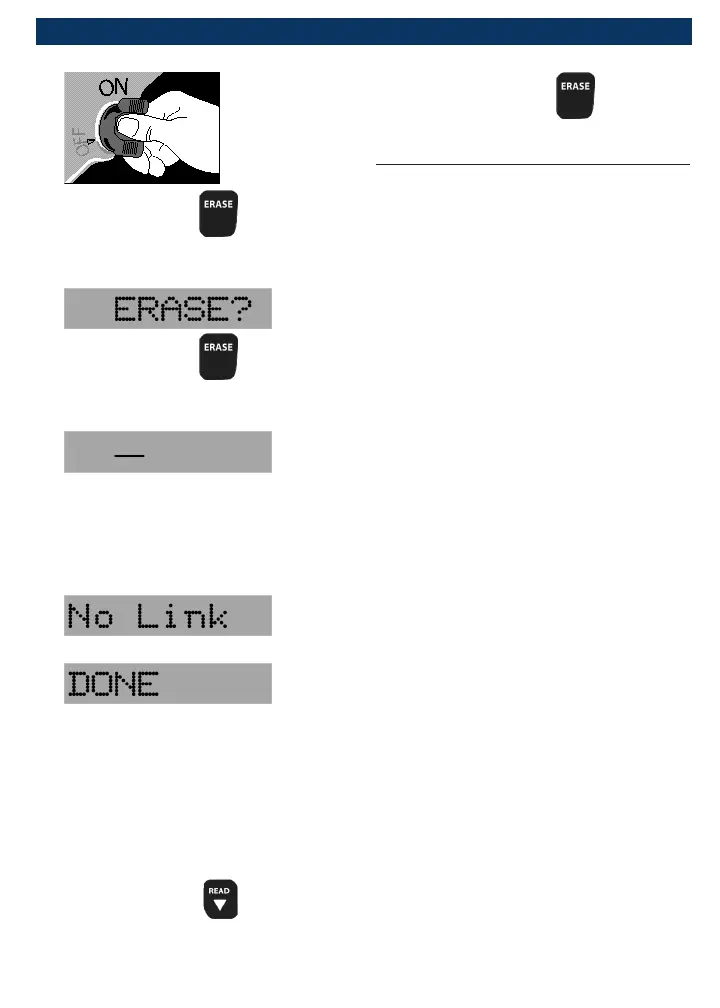
5. Press and hold for 3 sec-
onds and release.
6. Observe “ERASE?” displays.
7. Press and hold for 3 sec-
onds and release.
8. Observe a moving — on display.
NOTE: If a “NO LINK” message
displays, cycle ignition key to the
OFF position for 10 seconds,
then back ON, and repeat “Eras-
ing Diagnostic Data” procedure.
9. Observe “DONE” displays.
NOTE: If the problem causing
diagnostic trouble code(s) still
exists, the code will return. The
diagnostic trouble code may
return immediately or may
return after vehicle has been
driven.
NOTE: Pressing
will read
diagnostic trouble codes and
data and holding will erase
results again.
Diagnostic Trouble Codes
This section contains the J2012
Diagnostic Trouble Codes (DTCs) as
defined by the Society of Automotive
Engineers (SAE).
DTCs are recommendations not a
requirement. Manufacturers may not
follow these, but most do.
Check vehicle’s service manual for
DTC meaning if the code(s) you are
getting does not make sense.
DTC definitions have been assigned
or reserved by the Society of Automo-
tive Engineers (SAE) to direct to
proper service area(s).
Codes not assigned or reserved by
the SAE are reserved for the manu-
facturer and referred to as Manufac-
turer Specific DTCs.
Remember:
• Visual inspections are important!
• Problems with wiring and connec-
tors are common, especially for
intermittent faults.
• Mechanical problems (vacuum
leaks, binding or sticking linkages,
etc.) can make a good sensor look
bad to the computer.
• Incorrect information from a
sensor may cause the computer
to control the engine in the
wrong way. Faulty engine opera-
tion might even make the com-


 To Next Page